Install
| Product | Versions |
|---|---|
| .NET |
README



Iciclecreek.Avalonia.SixelBuffer
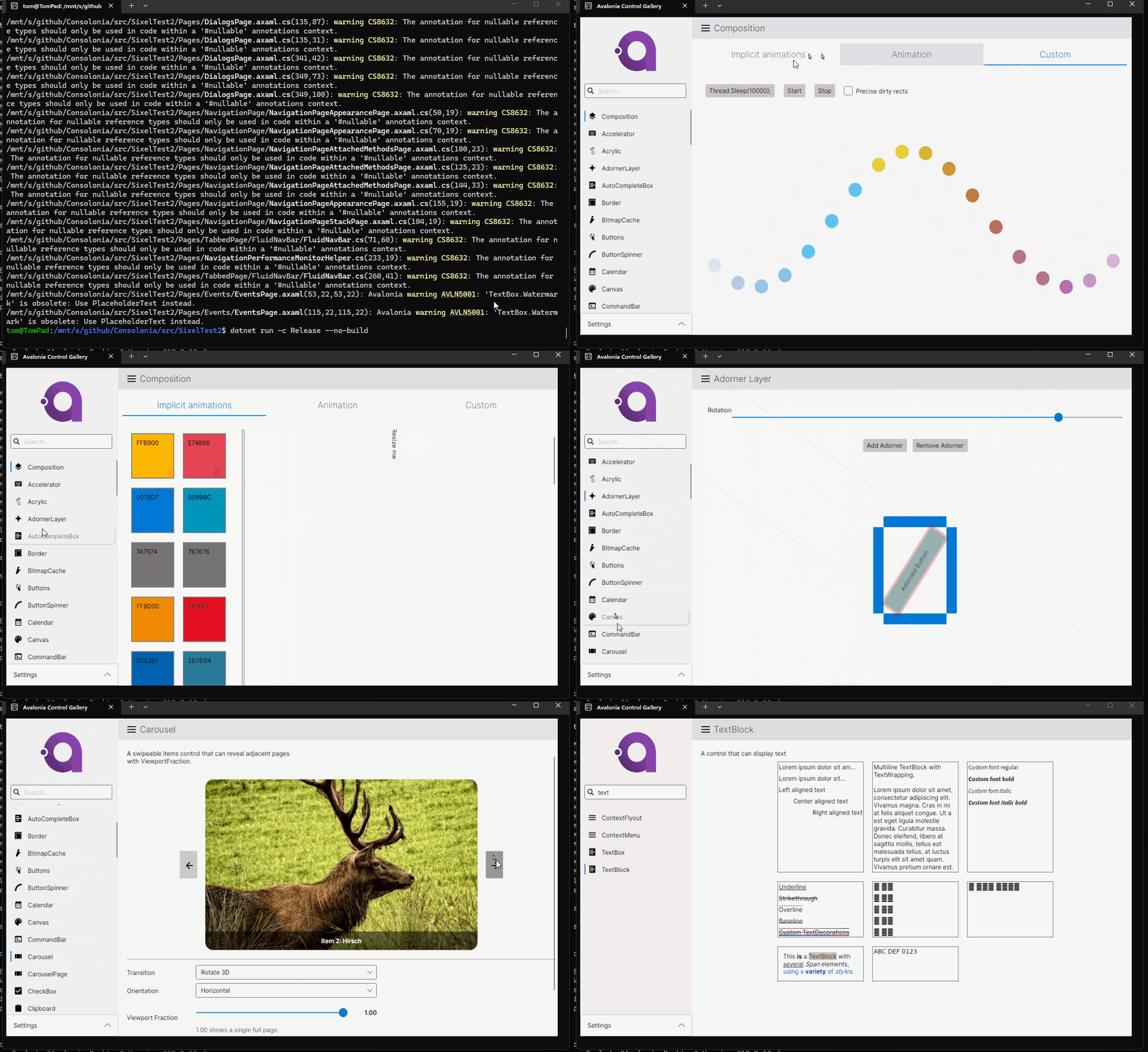
Run your Avalonia applications directly in a terminal using Sixel graphics. This library provides a custom windowing and rendering subsystem that converts Avalonia's Skia output into Sixel image sequences, enabling full GUI applications to run inside a terminal emulator that supports Sixel graphics.
Overview
Iciclecreek.Avalonia.SixelBuffer replaces Avalonia's native windowing platform with a terminal-based implementation:
- Sixel rendering -- Avalonia controls are rendered via Skia, quantized to a 256-color palette, and output as Sixel escape sequences.
- Input handling -- Keyboard and mouse input are read from stdin using VT/ANSI escape sequence parsing (including SGR extended mouse tracking).
- Frame diffing -- Only changed regions are re-rendered, with dirty-rect tracking and SIMD-optimized sixel band construction for performance.
- Software cursor -- A composited software cursor is drawn into the frame since hardware cursors aren't available in terminal mode.
Requires a Sixel-capable terminal emulator such as Windows Terminal, WezTerm, iTerm2, etc. See https://www.arewesixelyet.com/ for a list of compatible terminals.
Install
dotnet add package Iciclecreek.Avalonia.SixelBuffer
Configuring Program.cs
Create a new target console application and replace the contents of Program.cs with the following code to initialize Avalonia with the SixelBuffer platform:
using Avalonia;
using Avalonia.Terminal;

internal static class Program
{
    [STAThread]
    private static void Main(string[] args)
    {
        BuildAvaloniaApp()
            .StartWithConsoleLifetime(args);
    }

    public static AppBuilder BuildAvaloniaApp()
    {
        return AppBuilder.Configure<App>()
            .UseStandardRuntimePlatformSubsystem()
            .WithInterFont()
            .UseSixelBuffer();
    }
}
Notes
- Terminal compatibility -- Your terminal must support Sixel graphics. Tested with Windows Terminal, WezTerm,
- Render rate -- The default render timer runs at 10 FPS to balance responsiveness with terminal throughput. NOTE: If you set too high input will be starved.
- No native Menus -- Don't use NativeMenu/NativeMenuItem as they won't work in terminal mode. Use Avalonia's Menu control instead.
- No native popups -- Popups and dropdown overlays are managed within the single terminal frame rather than as separate OS windows.
- Avalonia version pinning -- The library uses Avalonia private APIs and must be pinned to the exact Avalonia version (currently 12.0.2).
- Mouse resolution -- Mouse input is limited to the terminal's reporting resolution, which is the same as the character cell grid. This
- means you won't get pixel-level mouse coordinates, only the cell coordinates of the terminal.
Changes from Previous Version
Adoption Assessment
Assess this package against its supported frameworks, license, maintenance signals and dependency graph before making it a project standard.
Related Guides & Workflows
Learn how to evaluate, integrate, or audit this package in your .NET project.