Get Started
No framework information available.
README
Runs dotnet test with retries for failed tests automatically, and pretty-prints aggregated
test results, integrating also with GitHub PR comments just like dotnet-trx.
Install latest and run with a single command: dnx retest.
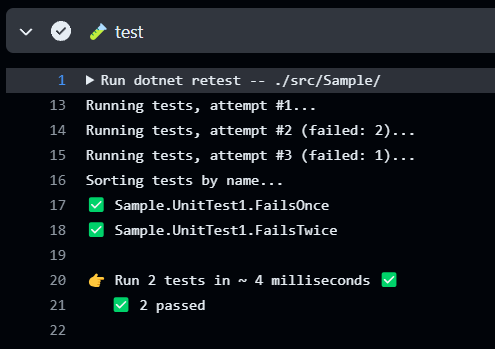
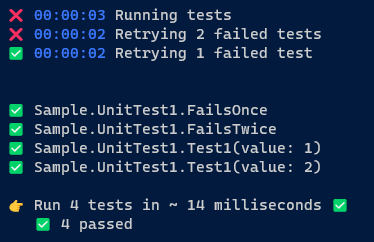
When running locally, it provides live progress on each run:

and timing and outcome for each attempt:
Typical usage: dotnet retest [OPTIONS] [-- [dotnet test options]]:
    - name: 🧪 test
      run: |
        dotnet tool update -g dotnet-retest
        dotnet retest -- --no-build [other test options and args]
PR comment integration:
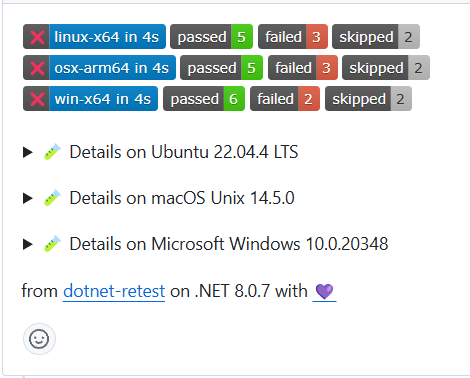
NOTE: this behavior is triggered by the presence of the
GITHUB_REF_NAMEandCIenvironment variables.
USAGE:
    dotnet retest [OPTIONS] [-- [dotnet test options]]

OPTIONS:
                        DEFAULT
    -h, --help                     Prints help information
        --version                  Prints version information
        --retries       3          Maximum retries when re-running failed tests
        --no-summary               Whether to emit a summary to console/GitHub
        --output                   Include test output in report
    -v, --verbosity     Quiet      Output display verbosity:
                                   - quiet: only failed tests are displayed
                                   - normal: failed and skipped tests are
                                   displayed
                                   - verbose: failed, skipped and passed tests
                                   are displayed
        --gh-comment    True       Report as GitHub PR comment
        --gh-summary    True       Report as GitHub step summary
NOTE: rendering the passed tests requires
verboseverbosity, since typically you'll just want to see the failed tests in the report, especially in projects with large number of tests.
Install and Run latest:
dnx retest
Install:
dotnet tool install -g retest
Update:
dotnet tool update -g retest
Open Source Maintenance Fee
To ensure the long-term sustainability of this project, users of this package who generate revenue must pay an Open Source Maintenance Fee. While the source code is freely available under the terms of the License, this package and other aspects of the project require adherence to the Maintenance Fee.
To pay the Maintenance Fee, become a Sponsor at the proper OSMF tier. A single fee covers all of Devlooped packages.
Sponsors


Downloads by Version
Similar & Alternative Packages
Hand-picked matching NuGet libraries based on tags & ecosystem
Depended On By
Find packages that declare this package as a dependency. NuGet does not provide a reverse-dependency endpoint, so candidates are checked on demand.
Adoption Assessment
Assess this package against its supported frameworks, license, maintenance signals and dependency graph before making it a project standard.
Related Guides & Workflows
Learn how to evaluate, integrate, or audit this package in your .NET project.