dotnet-nugetize
A must-have complementary tool to NuGetizer, this tool will help you discover how NuGetizer packs a project rapidly iterate on your project's packaging until you get it just right for your needs.
Install
No framework information available.
README
The nugetize dotnet global tool (available after installation) allows quick iteration while creating nuget packages. This is done in the fastest possible way without compromising your customizations to the build process, all without incurring a full build/pack!
Carefully tweaking your packages until they look exactly the way you want them should not be a tedious and slow process. Even requiring your project to be built between changes can be costly and reduce the speed at which you can iterate on the packaging aspects of the project. Also, generating the final .nupkg, opening it in a tool and inspecting its content, is also not ideal for rapid iteration.
This tool works together with NuGetizer to provide the most productive solution for your packing needs. This is achieved is by a combination of a simulated design-time build that skips the compiler invocation and avoids the output file copying entirely, and built-in support in NuGetizer to emit the entire contents of the package as MSBuild items with full metadata, that the tool can use to render an accurate report that contains exactly the same information that would be used to emit the final .nupkg without actually generating it.
The following is the output of a comprehensive smart multi-targeted library example from the documentation:
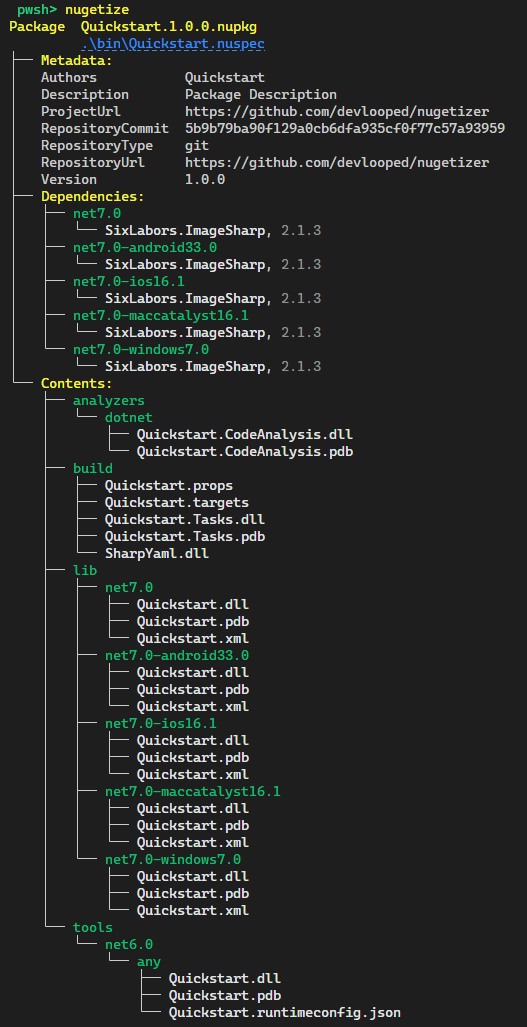
The tool will emit the .nuspec file so you can inspect precisely what's being packed and from where, should you need to dig deeper. Moreover, it's rendered as a helpful link (in most terminals) so you can click on it directly to open (i.e. from within the VSCode terminal).
NuGetizer supports running nugetize on all the samples in the documentation directly in your browser in a

As soon as the codespace is running, just use the terminal to go to the desired sample directory and just run nugetize! You can even open a pwsh terminal if that's more your thing.
NOTE:
dotnet-nugetizedoes not support projects that don't reference the NuGetizer package.
Changes from Previous Version
Adoption Assessment
Assess this package against its supported frameworks, license, maintenance signals and dependency graph before making it a project standard.
Related Guides & Workflows
Learn how to evaluate, integrate, or audit this package in your .NET project.