XenoAtom.Terminal
A modern, cross-platform replacement for System.Console: unified input events (keys/mouse/resize), rich ANSI/markup output (XenoAtom.Ansi), thread-safe atomic writes, CI-friendly colors, and an in-memory backend for deterministic tests.
Install
| Product | Versions |
|---|---|
| .NET |
README
XenoAtom.Terminal 

XenoAtom.Terminal is a modern replacement for System.Console designed for TUI/CLI apps: serialized output, rich ANSI/markup rendering, unified input events, and deterministic tests.
This project is under development and in pre-release status. The API may change before reaching a stable 1.0.0 version.
Quick start
using XenoAtom.Terminal;

Terminal.WriteLine("Hello");
Terminal.WriteMarkup("[bold green]Hello[/] [gray]world[/]!");
✨ Features
- Console-compatible API surface: Title, cursor, window,
ReadKey/ReadLine-style workflows - Output (ANSI-safe):
- Serialized writers prevent interleaved escape sequences across threads
- Atomic writes for multi-step output without tearing
- Markup + ANSI styling (powered by XenoAtom.Ansi)
- Input (unified events):
- Single event stream for keys, text, mouse, resize, signals
- Async + cancellation-friendly APIs for TUI loops
- Interactive ReadLine editor:
- Cursor movement, mid-line insert/delete, word navigation/delete
- Undo/redo + reverse incremental history search
- Selection by keyboard (Shift) and mouse click/drag
- History stored on the
TerminalReadLineOptionsinstance (shareable, not global) - Completion + extensibility via custom key/mouse handlers (
TerminalReadLineController) - Clipboard-friendly shortcuts (Ctrl+C/Ctrl+X/Ctrl+V) when available
- Styled prompt (
PromptMarkup) + custom line rendering (MarkupRenderer)
- Scopes + state management:
- Reliable scopes: alternate screen, raw/cbreak mode, bracketed paste, mouse reporting, hide cursor
- State tracking: style/colors/decorations, title, cursor position/visibility, window size
- Clipboard: cross-platform text copy/paste (including OSC 52 for remote shells)
- CI + testing:
- CI-aware backend keeps colors when output is redirected
- In-memory backend for deterministic tests (capture output + inject events)
- Cross-platform + AOT: Windows Console + Unix (Linux/macOS),
net10.0+ and NativeAOT-friendly design
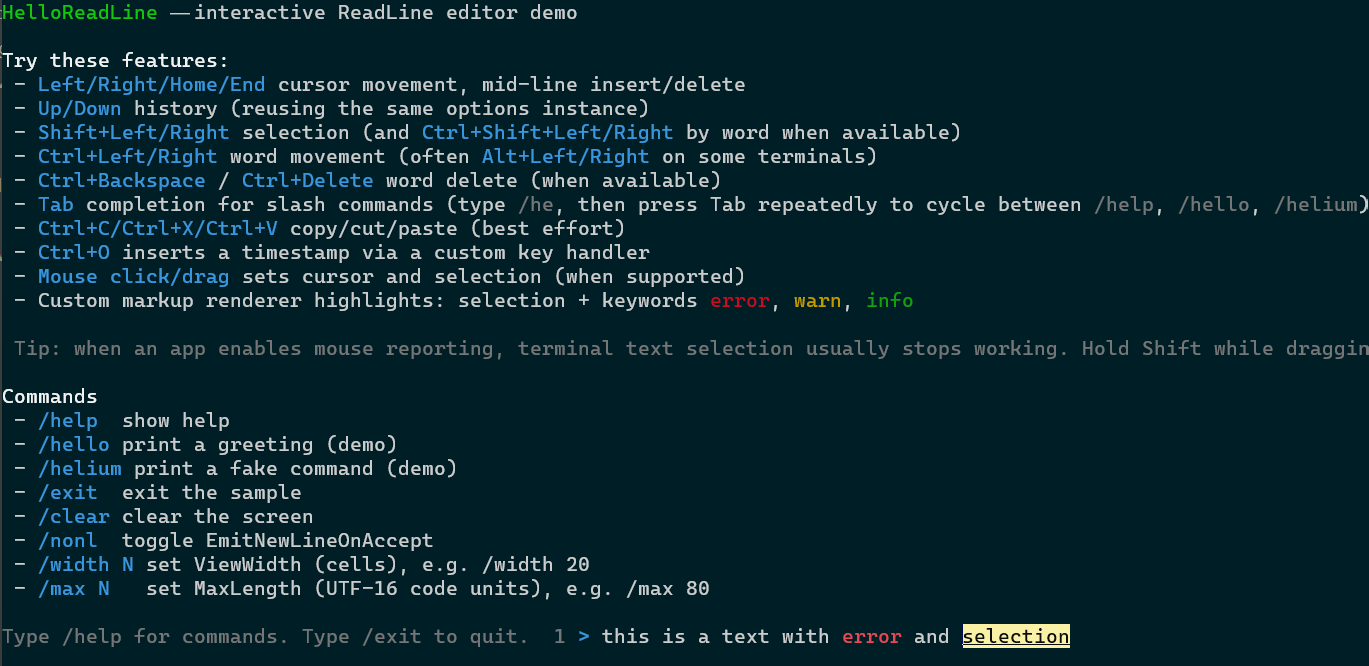
Screenshot of the interactive sample HelloReadLine demo:
XenoAtom.Terminal is a terminal API, not a widget/UI framework. It provides safe I/O, terminal state/scopes, and input events; higher-level libraries can build screen buffers, widgets, and layouts on top.
User Guide
For more details on how to use XenoAtom.Terminal, please visit the user guide.
Sample
samples/HelloTerminalprints all input events (key/mouse/resize/text/signal) and demonstrates scopes.samples/HelloReadLinedemonstrates the interactiveReadLineeditor (history, selection, completion, and markup rendering).samples/LogTerminalprints colored pseudo log lines (timestamp/level/category/message) and is run in CI to validate ANSI output.
License
This software is released under the BSD-2-Clause license.
Author
Alexandre Mutel aka xoofx.
Changes from Previous Version
Adoption Assessment
A verified publisher signal is available. Assess fit from the package's supported frameworks, license and dependency graph rather than popularity alone.
Related Guides & Workflows
Learn how to evaluate, integrate, or audit this package in your .NET project.