Install
| Product | Versions |
|---|---|
| .NET |
README
ActiveCampaign Contacts for Umbraco Forms
This integration provides a custom workflow for Umbraco Forms that will convert submitted contact information from your Umbraco webpage into an ActiveCampaign contact and a potential lead!
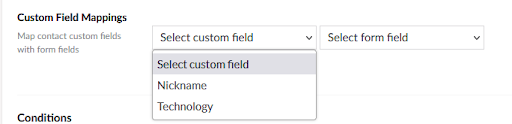
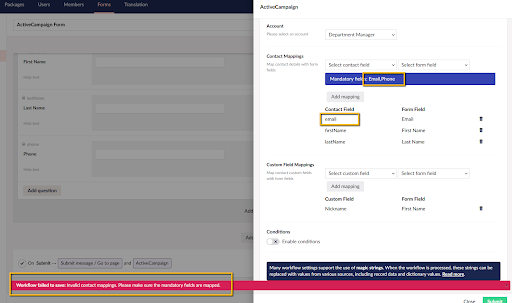
To start using the integration for Umbraco Forms you will need to attach the ActiveCampaign Contacts Workflow to a form, configure the mappings between the contact properties and the form fields, select an account if you want to associate the contacts, and map any contact custom fields.
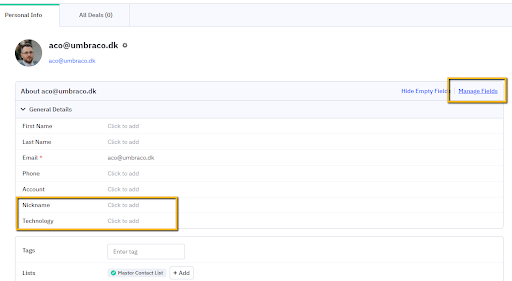
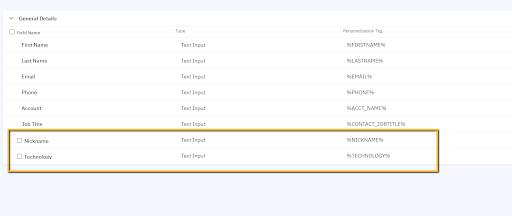
Custom fields are created in ActiveCampaign by managing the fields of an existing contact.
As you set up the workflow, the list of custom fields will be retrieved from your ActiveCampaign account and made available for mapping.
When a form that has the ActiveCampaign workflow attached is submitted, the contact is looked up by email, if a record is found and the AllowContactUpdate flag is false, the workflow execution will stop and a message logged. Otherwise, the custom fields will be added to the request object and then the contact record will get created or updated. If an account association has been specified, then the created contact will be associated with the account.
Want to know more about this integration?
If you want to see the details on how the integration to ActiveCampaign Contacts is made or just follow the example of extending Umbraco with a third-party system you can take a look at the blog post supplementing this integration.
Changes from Previous Version
Adoption Assessment
A verified publisher signal is available. Assess fit from the package's supported frameworks, license and dependency graph rather than popularity alone.
Related Guides & Workflows
Learn how to evaluate, integrate, or audit this package in your .NET project.