Install
| Product | Versions |
|---|---|
| .NET |
README
Microsoft Dynamics 365 - Marketing Form
This integration provides a form picker and a rendering component for marketing forms managed within your own Microsoft Dynamics 365. Select your form and use it on your Umbraco webpage!
The integration supports embedding Dynamics 365 Marketing Forms into an Umbraco web page, by providing a custom form picker and a rendering component, that returns through a strongly typed model the necessary form properties for rendering the form using an iframe or custom JS scripts.
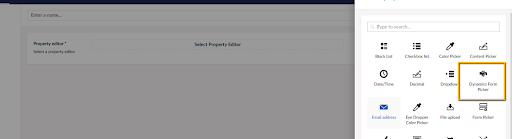
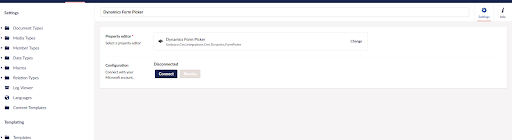
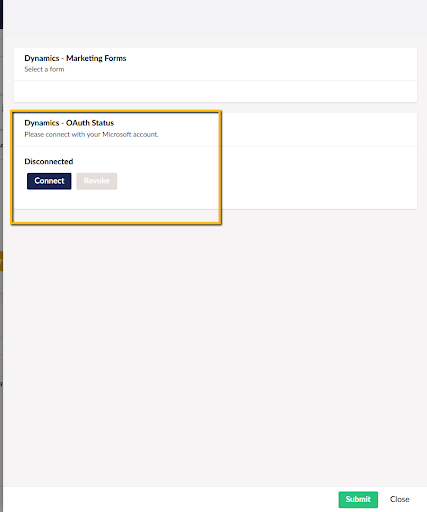
When the data type is created and registered in your backoffice you can connect to your Microsoft account in the configuration section.
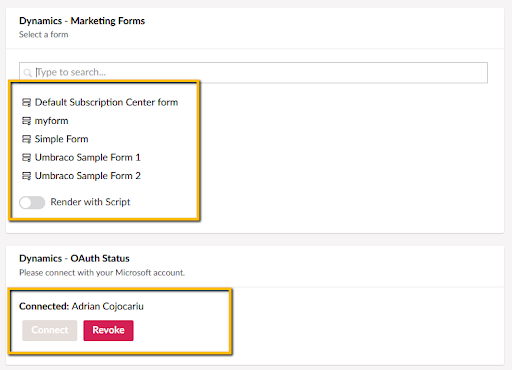
After connecting with your account, the list of forms from Dynamic 365 will be populated. When you have selected your form, you can select how you want it to be embedded, either as an iframe or through the JS script.
Want to know more about how the integration works? If you want to see the details on how the integration to Microsoft Dynamics 365 - Marketing Forms is made or want to follow the example of extending Umbraco with a third-party system you can take a look at the blog post supplementing this integration.
Changes from Previous Version
Adoption Assessment
A verified publisher signal is available. Assess fit from the package's supported frameworks, license and dependency graph rather than popularity alone.
Related Guides & Workflows
Learn how to evaluate, integrate, or audit this package in your .NET project.