This NuGet package for Blazor Server apps adding an ability that changes the current culture of each connection without reloading.
Get Started
| Product | Versions |
|---|---|
| .NET Standard |
README
Blazor Server Scoped Culture 
"It's a very dirty hack, but it works for now."
Summary
This is a library for Blazor Server apps adding an ability that changes the current culture of each connection without reloading.
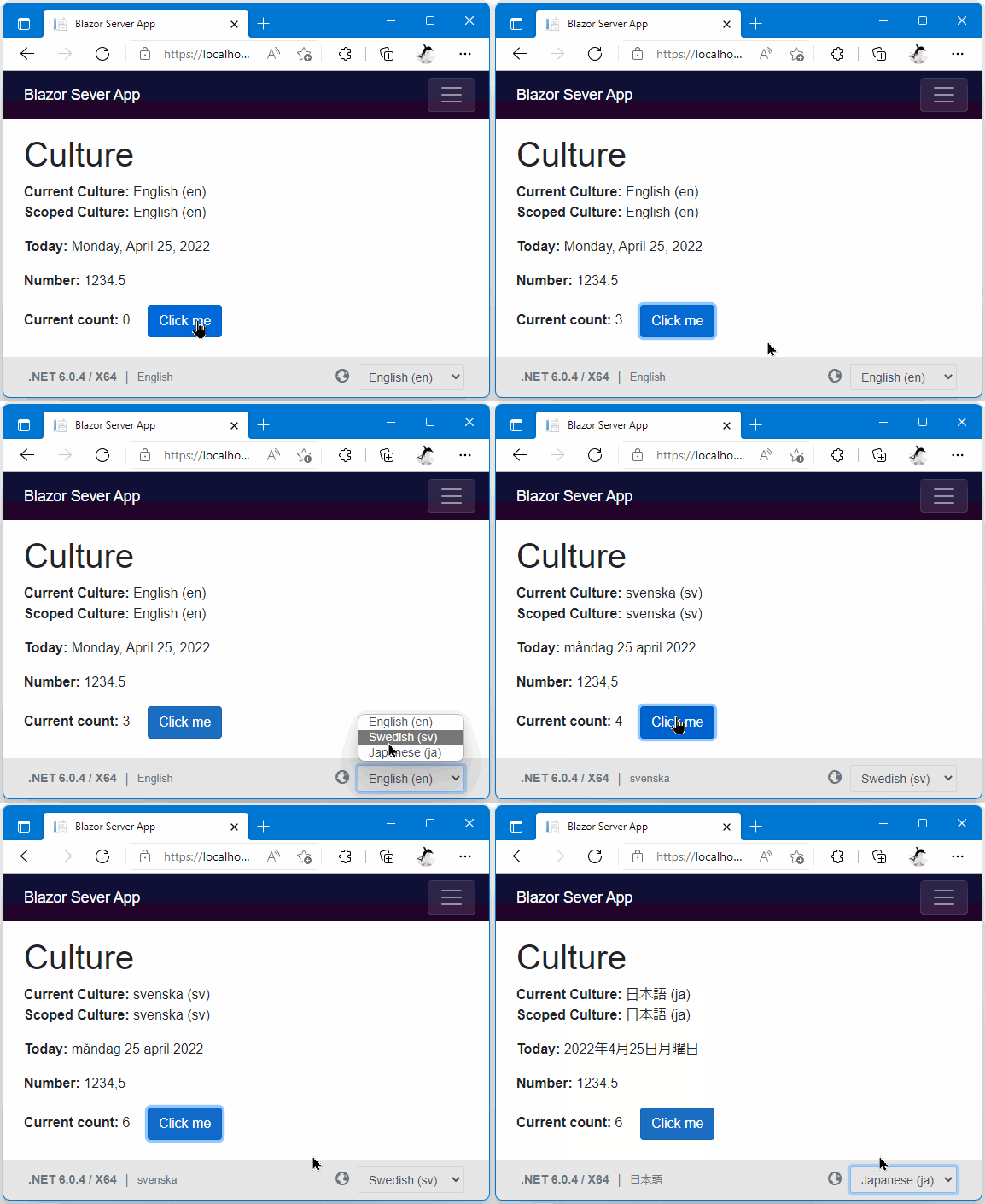
Quick Start
Installation
- Add the "Toolbelt.Blazor.Server.ScopedCulture" NuGet package to your Blazor server application project.
dotnet add package Toolbelt.Blazor.Server.ScopedCulture --prerelease
- Register the "Scoped Culture" service into DI container in your app.
// Program.cs
using Toolbelt.Blazor.Extensions.DependencyInjection; // 👈 Open this namespace, and...
...
builder.Services.AddScopedCulture(); // 👈 Add this line.
...
- To be convinience, open the "Toolbelt.Blazor.Server.ScopedCulture" name space globally.
@* _Import.razor *@
...
@* 👇 Open this name space. *@
@using Toolbelt.Blazor.Server.ScopedCulture
- Surround the entire contents in
App.razorwith the<ScopedCultureZone>component tag.
@* App.razor *@
<ScopedCultureZone>
  <Router AppAssembly="@typeof(Program).Assembly">
    ...
  </Router>
</ScopedCultureZone>
Usage
When you want to change the current culture & current UI culture, don't set the culture values you want to change to CultureInfo.CurrentCulture and CultureInfo.CurrentUICulture static properties directly because it doesn't cause any effect.
Instead, now you can call the SetCurrentCulture() method of the IScopedCulture service anytime with the culture name you want to change.
The SignalR connection and application states will be kept.
@* *.razor *@
@* 👇 Inject the IScopedCulture service into your Razor components. *@
@inject IScopedCulture ScopedCulture
...
@code {
  ...
  // 👇 Call "SetCurrentCulture()" method with the culture name such as "en", "sv", "ja", etc.
  this.ScopedCulture.SetCurrentCulture(cultureName);
  ...
Track to changes in current culture
Suppose you need to track changing current culture in the current connection on Blazor server apps, particularly re-rendering components after changed culture.
In that case, you can do that by one of the following three methods.
Method A. Surround contents by the ScopedCultureZone component
When you change the current culture in the current connection on Blazor Server apps, a ScopedCultureZone component's StateHasChanged() method will be invoked.
Then, that will cause re-rendering of the child content inside a ScopedCultureZone component.
@* *.razor *@
<ScopedCultureZone>
  This area will be re-rendered every time you change the current
  culture by using the "ScopedCulture.SetCurrentCulture()".
</ScopedCultureZone>
Method B. Register componets to re-render by the RefreshWhenCultureChanged() method
Once you invoke the IScopedCulture.RefreshWhenCultureChanged() method with your component as an argument, that component's StateHasChanged() method will be invoked every time you change the current culture in the current connection on Blazor Server apps.
@* *.razor *@
@inject IScopedCulture ScopedCulture
...
@code
{
  public override void OnInitialized()
  {
    // 👇 After doing this, the "StateHasChanged()" method of this component
    //    will be invoked every time you change the current culture
    //    by using the "IScopedCulture.SetCurrentCulture()".
    this.ScopedCulture.RefreshWhenCultureChanged(this);
  }
}
Method C. Handle the IScopedCulture.CurrentCultureChanged event
@* *.razor *@
@* 👇 Please remember to implement IDisposable interface. *@
@implements IDisposable
@inject IScopedCulture ScopedCulture
...
@code
{
  public override void OnInitialized()
  {
    // 👇 Handle the `IScopedCulture.CurrentCultureChanged` event.
    this.ScopedCulture.CurrentCultureChanged += this.ScopedCulture_CurrentCultureChanged;
  }

  private void ScopedCulture_CurrentCultureChanged(object sender, EventArgs e) {
    // 👉 This method will be invoked every time you change
    // the current culture by using the "IScopedCulture.SetCurrentCulture()".
  }

  public void Dispose() {
    // 👇 Please remember to detach the event handler.
    this.ScopedCulture.CurrentCultureChanged -= this.ScopedCulture_CurrentCultureChanged;
  }
}
Supported versions
Blazor Server apps on .NET Core 3.1 or later (including .NET 5.0, 6.0, 7.0) are supported.
Disclaimer
Please remember that this library access and overwrite non-public API of the Blazor Server's infrastructure.
That means there is a risk that this library might cause your apps to be crashed unexpectedly in the current and future versions of .NET.
Release notes
The release notes is here.
License
Downloads by Version
Similar & Alternative Packages
Hand-picked matching NuGet libraries based on tags & ecosystem
Depended On By
Find packages that declare this package as a dependency. NuGet does not provide a reverse-dependency endpoint, so candidates are checked on demand.
Adoption Assessment
Assess this package against its supported frameworks, license, maintenance signals and dependency graph before making it a project standard.
Related Guides & Workflows
Learn how to evaluate, integrate, or audit this package in your .NET project.