This package provides the functionality to utilize the features of Syncfusion® Maui Scheduler control and more.
Install
| Product | Versions |
|---|---|
| .NET |
README
Syncfusion .NET MAUI Scheduler (SfScheduler)
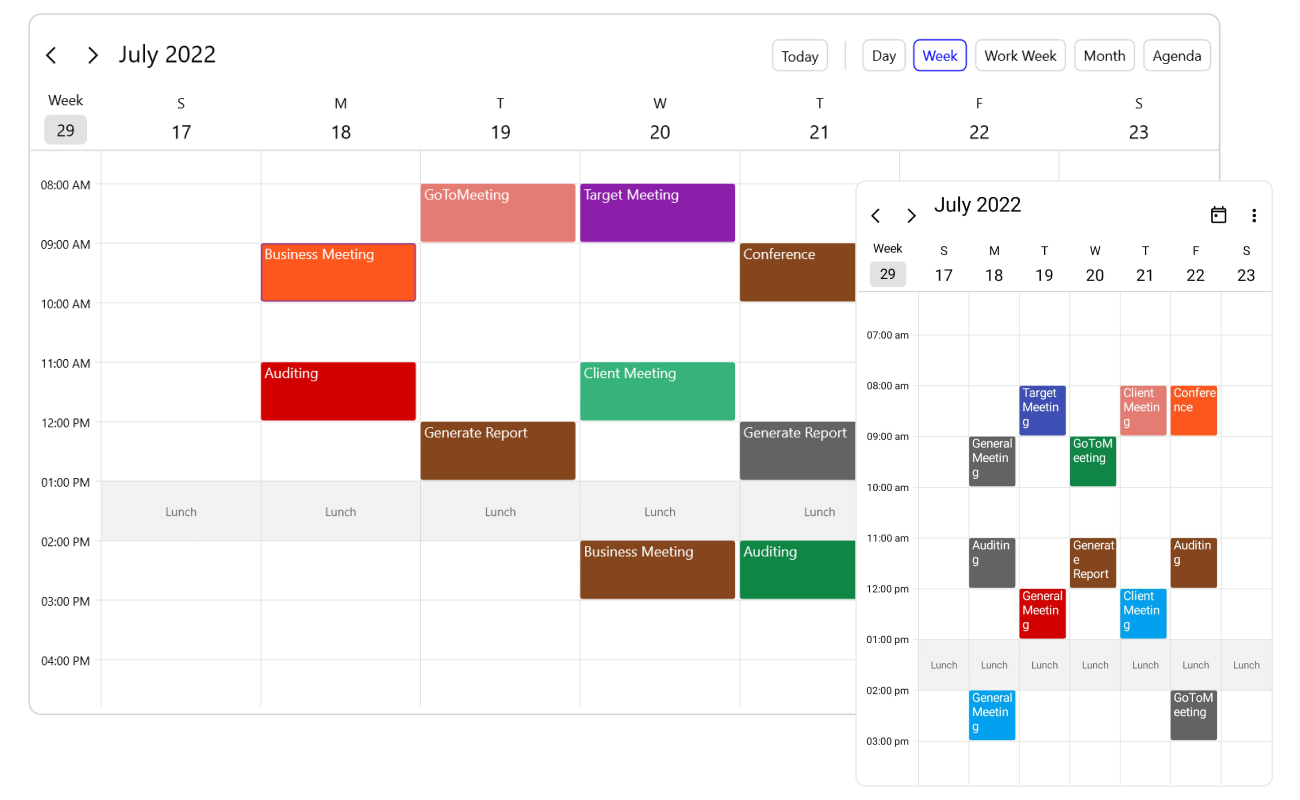
The Syncfusion .NET MAUI Scheduler is a full-featured event calendar for scheduling and managing appointments. It works much like the calendar built into a phone or computer. Choose from nine views, with support for recurring events, time zones, resources, and loading data on demand. Build scheduling apps for Android, iOS, macOS, and Windows from a single codebase.
Documentation · Getting Started · API Reference · Demos on GitHub · Product Page · Release Notes
Using this package with an AI coding agent
Before generating Syncfusion code, ask your AI coding agent to run the Syncfusion setup using the following prompt:
Set up this project for Syncfusion before generating code. Fetch and follow the official instructions at https://ai.syncfusion.com, then report the detected platform, installed skill pack, MCP status, and any required licensing action.The setup detects your project’s platform and loads the appropriate Syncfusion skill pack. No Syncfusion account or MCP key is required to install or read Syncfusion agent skills.
Platform reference: https://ai.syncfusion.com/maui/llms.txt
Key features
Views
- Day, Week, and Work Week views for detailed, hour-by-hour scheduling.
- Month view, which shows appointments as text or as indicators.
- Agenda view, a scrollable list of upcoming appointments.
- Timeline views (Day, Week, Work Week, and Month) that lay time out horizontally, which suits resource planning.
- Let users switch between views, and limit which views are allowed.
Appointments
- Bind to built-in
SchedulerAppointmentobjects or to your own business objects through appointment mapping. - All-day, spanned (multi-day), and timed appointments.
- Recurring appointments using standard RRULE patterns, with exceptions.
- Time zone support for the whole scheduler and for individual appointments.
- Load on demand, so appointments are fetched only for the visible date range.
- Reminders that alert users before an appointment starts.
Interaction
- Drag and drop and resize appointments to reschedule them.
- Built-in appointment editor for creating and editing events.
- Tap, double-tap, and long-press events on appointments and time slots.
- Date navigation with a header date picker, swipe gestures, and minimum and maximum dates.
Resources and time regions
- Resource view to schedule people, rooms, or equipment side by side.
- Special time regions to block or highlight time ranges such as lunch breaks or non-working hours.
- Blackout dates to disable specific dates.
- Configurable working hours, first day of the week, and time interval.
Look and feel
- Customize the header, view header, time slots, cells, and appointments with templates and styles.
- Week numbers, today highlight, and current-time indicator.
- Built-in light and dark themes.
- Right-to-left (RTL) support, localization, and accessibility.
Supported platforms
| Platform | Target framework |
|---|---|
| Android | net9.0-android, net10.0-android |
| iOS | net9.0-ios, net10.0-ios |
| macOS (Mac Catalyst) | net9.0-maccatalyst, net10.0-maccatalyst |
| Windows | net9.0-windows10.0.19041, net10.0-windows10.0.19041 |
Minimum OS versions follow the .NET MAUI supported platforms.
Installation
.NET CLI
dotnet add package Syncfusion.Maui.Scheduler
Package Manager Console
Install-Package Syncfusion.Maui.Scheduler
Getting started
1. Register the Syncfusion core handler
In MauiProgram.cs, call ConfigureSyncfusionCore():
using Syncfusion.Maui.Core.Hosting;

public static class MauiProgram
{
    public static MauiApp CreateMauiApp()
    {
        var builder = MauiApp.CreateBuilder();
        builder
            .UseMauiApp<App>()
            .ConfigureSyncfusionCore();

        return builder.Build();
    }
}
2. Add SfScheduler to your page
<ContentPage xmlns="http://schemas.microsoft.com/dotnet/2021/maui"
             xmlns:x="http://schemas.microsoft.com/winfx/2009/xaml"
             xmlns:scheduler="clr-namespace:Syncfusion.Maui.Scheduler;assembly=Syncfusion.Maui.Scheduler"
             xmlns:local="clr-namespace:YourAppNamespace"
             x:Class="YourAppNamespace.MainPage">

    <ContentPage.BindingContext>
        <local:SchedulerViewModel />
    </ContentPage.BindingContext>

    <scheduler:SfScheduler View="Week"
                           AppointmentsSource="{Binding Events}" />

</ContentPage>
3. Add appointments
using System.Collections.ObjectModel;
using Syncfusion.Maui.Scheduler;

public class SchedulerViewModel
{
    public ObservableCollection<SchedulerAppointment> Events { get; set; }

    public SchedulerViewModel()
    {
        var today = DateTime.Today;

        Events = new ObservableCollection<SchedulerAppointment>
        {
            new SchedulerAppointment
            {
                Subject = "Team Stand-up",
                StartTime = today.AddHours(9),
                EndTime = today.AddHours(9.5),
                Background = Brush.SteelBlue
            },
            new SchedulerAppointment
            {
                Subject = "Client Meeting",
                StartTime = today.AddHours(14),
                EndTime = today.AddHours(15),
                Background = Brush.OrangeRed
            }
        };
    }
}
Run the app. The scheduler opens in Week view and shows today's appointments.
Common scenarios
Bind your own business objects
Use AppointmentMapping to map your model's properties to the scheduler's appointment fields:
public class Meeting
{
    public string EventName { get; set; }
    public DateTime From { get; set; }
    public DateTime To { get; set; }
    public Brush Background { get; set; }
    public bool IsAllDay { get; set; }
}
<scheduler:SfScheduler View="Week"
                       AppointmentsSource="{Binding Meetings}">
    <scheduler:SfScheduler.AppointmentMapping>
        <scheduler:SchedulerAppointmentMapping Subject="EventName"
                                               StartTime="From"
                                               EndTime="To"
                                               Background="Background"
                                               IsAllDay="IsAllDay" />
    </scheduler:SfScheduler.AppointmentMapping>
</scheduler:SfScheduler>
Create a recurring appointment
var dailyScrum = new SchedulerAppointment
{
    Subject = "Daily Scrum",
    StartTime = DateTime.Today.AddHours(10),
    EndTime = DateTime.Today.AddHours(10.5),
    RecurrenceRule = "FREQ=DAILY;INTERVAL=1;COUNT=10"
};
Let users switch views
<scheduler:SfScheduler View="Week"
                       AllowedViews="Day,Week,WorkWeek,Month,Agenda,TimelineWeek" />
Set working hours
<scheduler:SfScheduler View="Week">
    <scheduler:SfScheduler.DaysView>
        <scheduler:SchedulerDaysView StartHour="9" EndHour="18" />
    </scheduler:SfScheduler.DaysView>
</scheduler:SfScheduler>
For more features, see the Scheduler documentation.
Dependencies
Installing this package also installs the following packages:
Microsoft.Maui.ControlsSyncfusion.Maui.CoreSyncfusion.Maui.CalendarSyncfusion.Maui.Buttons,Syncfusion.Maui.Inputs,Syncfusion.Maui.ListView,Syncfusion.Maui.NavigationDrawer,Syncfusion.Maui.Picker,Syncfusion.Maui.Popup
Licensing
This is a commercial product and requires a paid license. You have three options:
- Free Community License: for individual developers and small businesses. Check eligibility
- 30-day free trial: Start a trial
- Commercial license: View pricing
Register your license key
Register the key in MauiProgram.cs before the app is built:
Syncfusion.Licensing.SyncfusionLicenseProvider.RegisterLicense("YOUR_LICENSE_KEY");
For details, see Licensing overview. Use of this package is subject to the Syncfusion EULA.
Support and feedback
- Support tickets: Syncfusion Support Portal
- Community forums: .NET MAUI Forums
- Feature requests and bug reports: Feedback Portal
- Samples: Syncfusion .NET MAUI demos on GitHub
About Syncfusion
Founded in 2001 and headquartered in Research Triangle Park, N.C., Syncfusion has more than 26,000+ customers and more than 1 million users, including large financial institutions, Fortune 500 companies, and global IT consultancies.
Today, we provide 1600+ components and frameworks for web (Blazor, ASP.NET Core, ASP.NET MVC, ASP.NET WebForms, JavaScript, Angular, React, Vue, and Flutter), mobile (.NET MAUI, Xamarin, Flutter, UWP, and JavaScript), and desktop development (WinForms, WPF, WinUI, Flutter and UWP). We provide ready-to-deploy enterprise software for dashboards, reports, data integration, and big data processing. Many customers have saved millions in licensing fees by deploying our software.
[email protected] | www.syncfusion.com | Toll Free: 1-888-9 DOTNET
Changes from Previous Version
Adoption Assessment
A verified publisher signal is available. Assess fit from the package's supported frameworks, license and dependency graph rather than popularity alone.
Related Guides & Workflows
Learn how to evaluate, integrate, or audit this package in your .NET project.