Syncfusion.Maui.RichTextEditor
This package provides the functionality to utilize the features of Syncfusion® Maui RichTextEditor controls and more.
Install
| Product | Versions |
|---|---|
| .NET |
README
Syncfusion .NET MAUI RichTextEditor (SfRichTextEditor)
The Syncfusion .NET MAUI RichTextEditor enables users to create, edit, and format rich text content with a comprehensive toolbar and built-in formatting options. It was built from the ground up for performance, so it stays smooth and responsive even with large documents and complex formatting. Build rich text editing experiences for Android, iOS, macOS, and Windows from a single codebase.
Documentation · Getting Started · API Reference · Demos on GitHub · Product Page · Release Notes
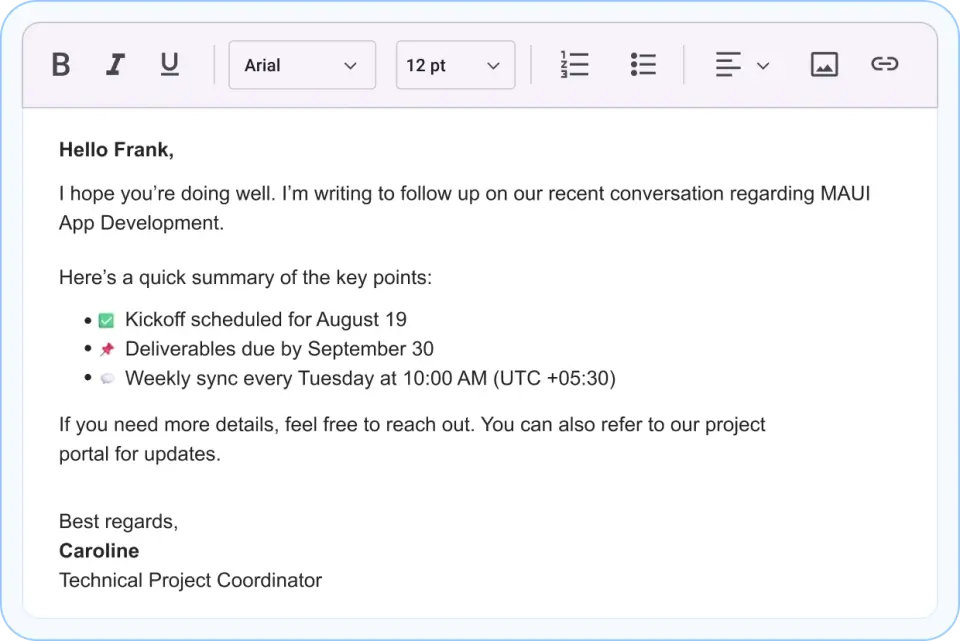
Key features
Text formatting
- Text styling: bold, italic, underline, strikethrough, and subscript/superscript.
- Font options: customizable font family, size, and color.
- Paragraph formatting: text alignment (left, center, right, justify).
- Indentation: increase and decrease indent for structured content.
Lists and structure
- Bullet and numbered lists: create organized lists with multiple levels.
- Clear formatting: remove all formatting and revert to plain text.
- Code blocks: embed code snippets with syntax highlighting.
Content management
- Insert elements: images, hyperlinks, tables, and custom HTML.
- Undo/Redo: full undo and redo support with history.
- Copy/Paste: smart handling of pasted content with formatting options.
Toolbar and UI
- Customizable toolbar: show/hide toolbar buttons and organize them in groups.
- Toolbar modes: compact and expanded toolbar layouts for different screen sizes.
- Theme support: light and dark theme support with customizable colors.
- Keyboard shortcuts: standard text editor shortcuts (Ctrl+B, Ctrl+I, Ctrl+U, etc.).
Output and export
- HTML export: extract formatted content as HTML.
- Plain text export: get unformatted text content.
More
- RTL support: right-to-left text direction for Arabic and Hebrew content.
- Localization: multi-language support for toolbar labels and menus.
Supported platforms
| Platform | Target framework |
|---|---|
| Android | net9.0-android, net10.0-android |
| iOS | net9.0-ios, net10.0-ios |
| macOS (Mac Catalyst) | net9.0-maccatalyst, net10.0-maccatalyst |
| Windows | net9.0-windows10.0.19041, net10.0-windows10.0.19041 |
Minimum OS versions follow the .NET MAUI supported platforms.
Installation
.NET CLI
dotnet add package Syncfusion.Maui.RichTextEditor
Package Manager Console
Install-Package Syncfusion.Maui.RichTextEditor
Getting started
1. Register the Syncfusion core handler
In MauiProgram.cs, call ConfigureSyncfusionCore():
using Syncfusion.Maui.Core.Hosting;

public static class MauiProgram
{
    public static MauiApp CreateMauiApp()
    {
        var builder = MauiApp.CreateBuilder();
        builder
            .UseMauiApp<App>()
            .ConfigureSyncfusionCore();

        return builder.Build();
    }
}
2. Create a ViewModel
using System.Collections.ObjectModel;

public class DocumentViewModel
{
    public string HtmlContent { get; set; }

    public DocumentViewModel()
    {
        HtmlContent = "<p><b>Welcome to RichTextEditor</b></p><p>Create and edit formatted text easily.</p>";
    }
}
3. Add SfRichTextEditor to your page
<ContentPage xmlns="http://schemas.microsoft.com/dotnet/2021/maui"
             xmlns:x="http://schemas.microsoft.com/winfx/2009/xaml"
             xmlns:syncfusion="clr-namespace:Syncfusion.Maui.RichTextEditor;assembly=Syncfusion.Maui.RichTextEditor"
             xmlns:local="clr-namespace:YourAppNamespace"
             x:Class="YourAppNamespace.MainPage">

    <ContentPage.BindingContext>
        <local:DocumentViewModel />
    </ContentPage.BindingContext>

    <Grid RowDefinitions="*, Auto">
        <syncfusion:SfRichTextEditor x:Name="RichTextEditor"
                                     Value="{Binding HtmlContent}"
                                     Grid.Row="0" />
    </Grid>

</ContentPage>
Run the app. The editor displays a toolbar with formatting options and an editable text area.
Common scenarios
Customize toolbar buttons
<syncfusion:SfRichTextEditor Value="Start typing...">
    <syncfusion:SfRichTextEditor.ToolbarItems>
        <syncfusion:RichTextToolbarItem Type="Bold" />
        <syncfusion:RichTextToolbarItem Type="Italic" />
        <syncfusion:RichTextToolbarItem Type="Underline" />
        <syncfusion:RichTextToolbarItem Type="StrikeThrough" />
        <syncfusion:RichTextToolbarItem Type="FontFamily" />
        <syncfusion:RichTextToolbarItem Type="FontSize" />
        <syncfusion:RichTextToolbarItem Type="TextColor" />
    </syncfusion:SfRichTextEditor.ToolbarItems>
</syncfusion:SfRichTextEditor>
Set height and placeholder text
<syncfusion:SfRichTextEditor Value="Start typing..."
                             HeightRequest="400"
                             Placeholder ="Enter your content here..."
                             BorderColor="Gray" />
Insert content programmatically
public class ContentInsertViewModel
{
    private SfRichTextEditor editor;

    public void InsertLink()
    {
        editor.InsertHyperlink("https://www.syncfusion.com", "Syncfusion");
    }

    public void InsertImage()
    {
        RichTextEditorImageSource richTextEditorImageSource = new();
        richTextEditorImageSource.Source = ImageSource.FromUri(new Uri("https://aka.ms/campus.jpg"));
        editor.InsertImage(richTextEditorImageSource);
    }

    public void InsertTable()
    {
        editor.InsertTable(rowCount: 3, columnCount: 3);
    }
}
For more features, see the RichTextEditor documentation.
Dependencies
Installing this package also installs the following packages:
Microsoft.Maui.ControlsSyncfusion.Maui.ButtonsSyncfusion.Maui.CoreSyncfusion.Maui.InputsSyncfusion.Maui.ListViewSyncfusion.Maui.PickerSyncfusion.Maui.PopupSyncfusion.Maui.SlidersSyncfusion.Maui.Toolbar
Licensing
This is a commercial product and requires a paid license. You have three options:
- Free Community License: for individual developers and small businesses. Check eligibility
- 30-day free trial: Start a trial
- Commercial license: View pricing
Register your license key
Register the key in MauiProgram.cs before the app is built:
Syncfusion.Licensing.SyncfusionLicenseProvider.RegisterLicense("YOUR_LICENSE_KEY");
For details, see Licensing overview. Use of this package is subject to the Syncfusion EULA.
Support and feedback
- Support tickets: Syncfusion Support Portal
- Community forums: .NET MAUI Forums
- Feature requests and bug reports: Feedback Portal
- Samples: Syncfusion .NET MAUI demos on GitHub
About Syncfusion®
Founded in 2001 and headquartered in Research Triangle Park, N.C., Syncfusion® has more than 26,000+ customers and more than 1 million users, including large financial institutions, Fortune 500 companies, and global IT consultancies.
Today, we provide 1600+ components and frameworks for web (Blazor, ASP.NET Core, ASP.NET MVC, ASP.NET WebForms, JavaScript, Angular, React, Vue, and Flutter), mobile (.NET MAUI, Xamarin, Flutter, UWP, and JavaScript), and desktop development (WinForms, WPF, WinUI, Flutter and UWP). We provide ready-to-deploy enterprise software for dashboards, reports, data integration, and big data processing. Many customers have saved millions in licensing fees by deploying our software.
[email protected] | www.syncfusion.com | Toll Free: 1-888-9 DOTNET
Changes from Previous Version
Adoption Assessment
A verified publisher signal is available. Assess fit from the package's supported frameworks, license and dependency graph rather than popularity alone.
Related Guides & Workflows
Learn how to evaluate, integrate, or audit this package in your .NET project.