Syncfusion.Maui.Maps
This package provides the functionality to utilize the features of Syncfusion® Maui Maps control and more.
Install
| Product | Versions |
|---|---|
| .NET |
README
Syncfusion .NET MAUI Maps (SfMaps)
The Syncfusion .NET MAUI Maps component is a comprehensive geospatial data visualization control for displaying geographical data with rich mapping features. Build interactive map applications for Android, iOS, macOS, and Windows from a single codebase. With support for vector layers, tile layers, markers, bubbles, color mapping, and zoom/pan navigation, you can create sophisticated mapping applications with ease.
Documentation · Getting Started · API Reference · Demos on GitHub · Product Page · Release Notes
Key features
Map Layers and Data Sources
- Shape Layer - Display vector shapes from GeoJSON and shapefile sources
- Tile Layer - Support for multiple tile providers (OpenStreetMap, Azure Maps, Google Maps, Bing Maps)
- Multiple data sources - Bind to complex hierarchical data
- Data-driven visualization - Automatic styling based on data values
Map Elements
- Markers - Add custom markers with clustering support and tooltip
- Bubbles - Visualize data as bubbles with customizable sizes and colors
- Data Labels - Display text labels on shapes and bubbles
- Legends - Built-in legend support with customizable appearance and interactive items
Color Mapping
- Range-based mapping - Color gradients based on numeric ranges
- Equal value mapping - Discrete colors for categorical data
- Custom colors - Full control over color palettes
- Dynamic updates - Real-time color changes with data updates
Interaction & Navigation
- Zoom & Pan - Interactive zooming (pinch, mouse wheel) and panning
- Selection - Highlight and select shapes, markers, and bubbles
- Tooltips - Interactive tooltips for shapes and markers
- Tap/Click handling - Respond to user interactions
Customization
- Theme support - Multiple built-in themes with full customization
- Custom styling - Control colors, fonts, and visual effects per element
- Custom templates - Support for custom layouts and content
- Appearance control - Fine-grained visual customization
Performance
- Optimized rendering - Efficient visualization of large datasets
- Viewport culling - Only visible elements are rendered
- Tile caching - Smart caching for tile layers
- Responsive animations - Smooth transitions and interactions
More
- Export to Image - Export maps as PNG/JPG files
- Right-to-left (RTL) support and localization
- Accessibility support - Inclusive applications for all users
- Responsive design - Adaptive layouts for various screen sizes
Supported platforms
| Platform | Target framework |
|---|---|
| Android | net9.0-android, net10.0-android |
| iOS | net9.0-ios, net10.0-ios |
| macOS (Mac Catalyst) | net9.0-maccatalyst, net10.0-maccatalyst |
| Windows | net9.0-windows10.0.19041, net10.0-windows10.0.19041 |
Minimum OS versions follow the .NET MAUI supported platforms.
Installation
.NET CLI
dotnet add package Syncfusion.Maui.Maps
Package Manager Console
Install-Package Syncfusion.Maui.Maps
Getting started
1. Register the Syncfusion core handler
In MauiProgram.cs, call ConfigureSyncfusionCore():
using Syncfusion.Maui.Core.Hosting;

public static class MauiProgram
{
    public static MauiApp CreateMauiApp()
    {
        var builder = MauiApp.CreateBuilder();
        builder
            .UseMauiApp<App>()
            .ConfigureSyncfusionCore();

        return builder.Build();
    }
}
2. Create a model and a ViewModel
using System.Collections.ObjectModel;

public class LocationData
{
    public string Name { get; set; }
    public double Latitude { get; set; }
    public double Longitude { get; set; }
    public double Value { get; set; }
}

public class MapViewModel
{
    public ObservableCollection<LocationData> LocationCollection { get; set; }

    public MapViewModel()
    {
        LocationCollection = new ObservableCollection<LocationData>
        {
            new LocationData { Name = "New York", Latitude = 40.7128, Longitude = -74.0060, Value = 100 },
            new LocationData { Name = "London", Latitude = 51.5074, Longitude = -0.1278, Value = 85 },
            new LocationData { Name = "Tokyo", Latitude = 35.6762, Longitude = 139.6503, Value = 90 }
        };
    }
}
3. Add SfMaps to your page
<ContentPage xmlns="http://schemas.microsoft.com/dotnet/2021/maui"
             xmlns:x="http://schemas.microsoft.com/winfx/2009/xaml"
             xmlns:syncfusion="clr-namespace:Syncfusion.Maui.Maps;assembly=Syncfusion.Maui.Maps"
             xmlns:local="clr-namespace:YourAppNamespace"
             x:Class="YourAppNamespace.MainPage">

    <ContentPage.BindingContext>
        <local:MapViewModel />
    </ContentPage.BindingContext>

    <syncfusion:SfMaps>
        <syncfusion:SfMaps.Layer>
            <syncfusion:MapTileLayer UrlTemplate="https://tile.openstreetmap.org/{z}/{x}/{y}.png" />
        </syncfusion:SfMaps.Layer>
    </syncfusion:SfMaps>

</ContentPage>
Run the app to see your map in action. For more features and detailed examples, see the Maps documentation.
Maps Documentation
The Syncfusion® .NET MAUI Maps control displays rich statistical information for geographical areas. Perfect for displaying geographic data, creating heat maps, visualizing spatial distributions, and building interactive mapping applications with support for multiple layers and data sources.
Features Overview · Docs · Getting Started
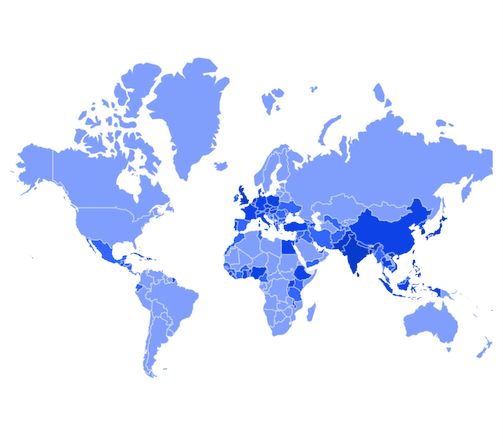
Map Layer Types
Shape Layer
Display vector geographic data from GeoJSON or shapefiles with full customization of appearance and data binding.
Tile Layer
Display raster map tiles from providers like OpenStreetMap, Azure Maps, Google Maps, and Bing Maps with caching support.
Dependencies
Installing this package also installs the following packages:
Microsoft.Maui.ControlsSyncfusion.Maui.Core
System Requirements
Using this package with an AI coding agent
Before generating Syncfusion code, ask your AI coding agent to run the Syncfusion setup using the following prompt:
Set up this project for Syncfusion before generating code. Fetch and follow the official instructions at https://ai.syncfusion.com, then report the detected platform, installed skill pack, MCP status, and any required licensing action.
The setup detects your project's platform and loads the appropriate Syncfusion skill pack. No Syncfusion account or MCP key is required to install or read Syncfusion agent skills.
Platform reference: https://ai.syncfusion.com/maui/llms.txt
Support and feedback
- Support tickets: Syncfusion Support Portal
- Community forums: .NET MAUI Forums
- Feature requests and bug reports: Feedback Portal
- Samples: Syncfusion .NET MAUI demos on GitHub
License
This is a commercial product and requires a paid license for possession or use. Syncfusion’s licensed software, including this component, is subject to the terms and conditions of Syncfusion's EULA. You can purchase a license here or start a free 30-day trial here.
About Syncfusion
Founded in 2001 and headquartered in Research Triangle Park, N.C., Syncfusion has more than 26,000+ customers and more than 1 million users, including large financial institutions, Fortune 500 companies, and global IT consultancies.
Today, we provide 1600+ components and frameworks for web (Blazor, ASP.NET Core, ASP.NET MVC, ASP.NET WebForms, JavaScript, Angular, React, Vue, and Flutter), mobile (.NET MAUI, Xamarin, Flutter, UWP, and JavaScript), and desktop development (WinForms, WPF, WinUI, Flutter and UWP). We provide ready-to-deploy enterprise software for dashboards, reports, data integration, and big data processing. Many customers have saved millions in licensing fees by deploying our software.
[email protected] | www.syncfusion.com | Toll Free: 1-888-9 DOTNET
Changes from Previous Version
Adoption Assessment
A verified publisher signal is available. Assess fit from the package's supported frameworks, license and dependency graph rather than popularity alone.
Related Guides & Workflows
Learn how to evaluate, integrate, or audit this package in your .NET project.