This package provides the functionality to utilize the features of Syncfusion® Maui Kanban controls.
Get Started
| Product | Versions |
|---|---|
| .NET |
README
Syncfusion .NET MAUI Kanban Board (SfKanban)
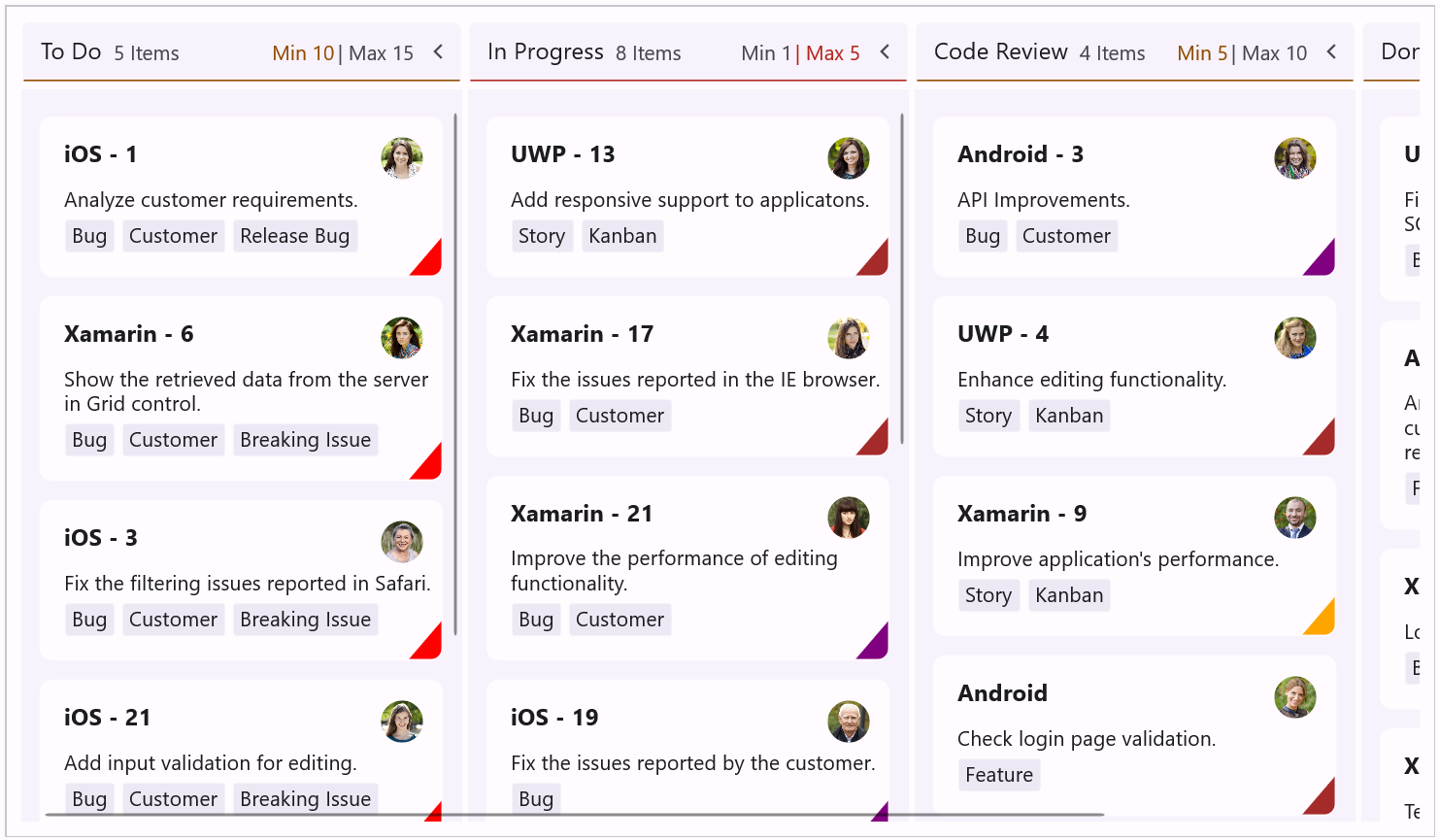
The Syncfusion .NET MAUI Kanban Board is a visual workflow management control that provides an efficient interface for tracking and visualizing different stages in a task or workflow. Move cards between columns with drag-and-drop, enforce workflow rules, and customize cards to fit any agile, manufacturing, or support scenario. Build kanban boards for Android, iOS, macOS, and Windows from a single codebase.
Documentation · Getting Started · API Reference · Demos on GitHub · Product Page · Release Notes
Using this package with an AI coding agent
Before generating Syncfusion code, ask your AI coding agent to run the Syncfusion setup using the following prompt:
Set up this project for Syncfusion before generating code. Fetch and follow the official instructions at https://ai.syncfusion.com, then report the detected platform, installed skill pack, MCP status, and any required licensing action.The setup detects your project’s platform and loads the appropriate Syncfusion skill pack. No Syncfusion account or MCP key is required to install or read Syncfusion agent skills.
Platform reference: https://ai.syncfusion.com/maui/llms.txt
Key features
Workflow visualization
- Visualize any process as columns (To Do, In Progress, Code Review, Done, etc.).
- Auto-generated columns from data categories, or manually defined columns for full control.
- Custom column titles, categories, and ordering.
- Group multiple categories in a single column.
Cards
- Bind to built-in
KanbanModelobjects or to your own business objects through card mapping. - Built-in card properties:
ID,Title,Description,Category,ImageURL,IndicatorFill,Tags. - Card templates for complete visual customization of cards.
- DataTemplateSelector for multiple card designs based on conditions.
- Status indicators, tag collections, and avatar image support.
Drag and drop
- Smooth drag-and-drop between columns to update task status.
- Visual feedback during drag operations.
- Drag events:
DragStart,DragOver,DragEndfor full control. - Cancel or validate drops programmatically.
Workflow rules
- KanbanWorkflow class to restrict allowed transitions between categories.
- Enforce quality gates (must pass code review before done).
- Prevent invalid transitions (cannot skip testing).
- Lock columns by allowing zero transitions out.
Work-in-progress (WIP) limits
- MinimumLimit and MaximumLimit per column.
- Visual indicators when limits are exceeded or under-utilized.
- Use with workflows to enforce capacity constraints.
Sorting
- SortingMappingPath to sort cards by any property.
- Ascending or Descending order.
- Index-based sorting for manual card ordering.
- Automatic resort on drag-and-drop.
Events
- CardTapped to handle card selections.
- DragStart, DragOver, DragEnd for drag-and-drop interactions.
- Cancel invalid operations and update backend systems.
Look and feel
- Liquid glass effect for modern, translucent designs (
EnableLiquidGlassEffect). - Theme integration with application resource dictionaries.
- Custom column headers with
HeaderTemplate. - Column sizing controls: fixed
ColumnWidth, orMinimumColumnWidth/MaximumColumnWidthranges. - Right-to-left (RTL) layout support for Arabic, Hebrew, and other RTL languages.
- Localization for multi-language apps.
Supported platforms
| Platform | Target framework |
|---|---|
| Android | net9.0-android, net10.0-android |
| iOS | net9.0-ios, net10.0-ios |
| macOS (Mac Catalyst) | net9.0-maccatalyst, net10.0-maccatalyst |
| Windows | net9.0-windows10.0.19041, net10.0-windows10.0.19041 |
Minimum OS versions follow the .NET MAUI supported platforms.
Installation
.NET CLI
dotnet add package Syncfusion.Maui.Kanban
Package Manager Console
Install-Package Syncfusion.Maui.Kanban
Getting started
1. Register the Syncfusion core handler
In MauiProgram.cs, call ConfigureSyncfusionCore():
using Syncfusion.Maui.Core.Hosting;

public static class MauiProgram
{
    public static MauiApp CreateMauiApp()
    {
        var builder = MauiApp.CreateBuilder();
        builder
            .UseMauiApp<App>()
            .ConfigureSyncfusionCore();

        return builder.Build();
    }
}
2. Create a ViewModel with KanbanModel cards
using System.Collections.ObjectModel;
using Syncfusion.Maui.Kanban;

public class KanbanViewModel
{
    public ObservableCollection<KanbanModel> Cards { get; set; }

    public KanbanViewModel()
    {
        Cards = new ObservableCollection<KanbanModel>
        {
            new KanbanModel
            {
                ID = 1,
                Title = "iOS - 1002",
                Category = "Open",
                Description = "Analyze customer requirements",
                IndicatorFill = Colors.Red,
                Tags = new List<string> { "Incident", "Customer" }
            },
            new KanbanModel
            {
                ID = 13,
                Title = "UWP - 13",
                Category = "In Progress",
                Description = "Add responsive support to application",
                IndicatorFill = Colors.Orange,
                Tags = new List<string> { "Story", "Customer" }
            },
            new KanbanModel
            {
                ID = 2543,
                Title = "iOS - 11",
                Category = "Code Review",
                Description = "Check login page validation",
                IndicatorFill = Colors.Blue,
                Tags = new List<string> { "Story" }
            },
            new KanbanModel
            {
                ID = 123,
                Title = "UWP - 21",
                Category = "Done",
                Description = "Check login page validation",
                IndicatorFill = Colors.Green,
                Tags = new List<string> { "Story", "Customer" }
            }
        };
    }
}
3. Add SfKanban to your page
<ContentPage xmlns="http://schemas.microsoft.com/dotnet/2021/maui"
             xmlns:x="http://schemas.microsoft.com/winfx/2009/xaml"
             xmlns:kanban="clr-namespace:Syncfusion.Maui.Kanban;assembly=Syncfusion.Maui.Kanban"
             xmlns:local="clr-namespace:YourAppNamespace"
             x:Class="YourAppNamespace.MainPage">

    <ContentPage.BindingContext>
        <local:KanbanViewModel />
    </ContentPage.BindingContext>

    <kanban:SfKanban x:Name="kanban"
                     AutoGenerateColumns="False"
                     ItemsSource="{Binding Cards}">
        <kanban:SfKanban.Columns>
            <kanban:KanbanColumn Title="To Do" Categories="Open" />
            <kanban:KanbanColumn Title="In Progress" Categories="In Progress" />
            <kanban:KanbanColumn Title="Code Review" Categories="Code Review" />
            <kanban:KanbanColumn Title="Done" Categories="Done" />
        </kanban:SfKanban.Columns>
    </kanban:SfKanban>

</ContentPage>
Run the app. The kanban board opens with cards routed to their columns based on the Category value.
Common scenarios
Use a custom data model with mapping
Map your existing models to the kanban control. A CardTemplate is required when not using KanbanModel.
public class TaskDetails
{
    public int TaskID { get; set; }
    public string TaskTitle { get; set; }
    public string TaskDescription { get; set; }
    public string Status { get; set; }
    public string Assignee { get; set; }
    public DateTime DueDate { get; set; }
    public string Priority { get; set; }
}
<kanban:SfKanban ItemsSource="{Binding Tasks}"
                 ColumnMappingPath="Status">
    <kanban:SfKanban.CardTemplate>
        <DataTemplate>
            <Border Stroke="LightGray"
                    StrokeThickness="1"
                    Padding="10"
                    Margin="5">
                <VerticalStackLayout Spacing="5">
                    <Label Text="{Binding TaskTitle}" FontAttributes="Bold" />
                    <Label Text="{Binding TaskDescription}" FontSize="12" />
                    <Label Text="{Binding Assignee}" FontSize="10" />
                </VerticalStackLayout>
            </Border>
        </DataTemplate>
    </kanban:SfKanban.CardTemplate>
</kanban:SfKanban>
Restrict card movement with workflows
kanban.Workflows = new List<KanbanWorkflow>
{
    new KanbanWorkflow("Open",        new List<object> { "In Progress" }),
    new KanbanWorkflow("In Progress", new List<object> { "Code Review", "Open" }),
    new KanbanWorkflow("Code Review", new List<object> { "Done", "In Progress" }),
    new KanbanWorkflow("Done",        new List<object>()) // locked column
};
Set WIP limits on columns
<kanban:KanbanColumn Title="In Progress"
                     Categories="In Progress"
                     MinimumLimit="1"
                     MaximumLimit="3" />
Sort cards within columns
<kanban:SfKanban ItemsSource="{Binding Cards}"
                 SortingMappingPath="Priority"
                 SortingOrder="Ascending" />
Handle card taps and drag events
<kanban:SfKanban x:Name="kanban"
                 ItemsSource="{Binding Cards}"
                 CardTapped="OnKanbanCardTapped"
                 DragStart="OnKanbanDragStart"
                 DragEnd="OnKanbanDragEnd" />
private async void OnKanbanCardTapped(object sender, KanbanCardTappedEventArgs e)
{
    var card = e.Data as KanbanModel;
    await DisplayAlert("Card", $"Tapped: {card.Title}", "OK");
}

private void OnKanbanDragEnd(object sender, KanbanDragEndEventArgs e)
{
    // Persist the new category to your data store
}
Enable liquid glass effect
<Grid BackgroundColor="Transparent">
    <core:SfGlassEffectView EffectType="Clear" CornerRadius="7">
        <kanban:SfKanban EnableLiquidGlassEffect="True"
                         Background="Transparent"
                         ItemsSource="{Binding Cards}" />
    </core:SfGlassEffectView>
</Grid>
For more features, see the Kanban Board documentation.
Dependencies
Installing this package also installs the following packages:
Microsoft.Maui.ControlsSyncfusion.Maui.Core
Licensing
This is a commercial product and requires a paid license for possession or use. Syncfusion’s licensed software, including this component, is subject to the terms and conditions of Syncfusion's EULA. You can purchase a license here or start a free 30-day trial here.
Register your license key
Register the key in MauiProgram.cs before the app is built:
Syncfusion.Licensing.SyncfusionLicenseProvider.RegisterLicense("YOUR_LICENSE_KEY");
Support and feedback
- Support tickets: Syncfusion Support Portal
- Community forums: .NET MAUI Forums
- Feature requests and bug reports: Feedback Portal
- Samples: Syncfusion .NET MAUI demos on GitHub
About Syncfusion
Founded in 2001 and headquartered in Research Triangle Park, N.C., Syncfusion® has more than 26,000+ customers and more than 1 million users, including large financial institutions, Fortune 500 companies, and global IT consultancies.
Today, we provide 1600+ components and frameworks for web (Blazor, ASP.NET Core, ASP.NET MVC, ASP.NET WebForms, JavaScript, Angular, React, Vue, and Flutter), mobile (Xamarin, Flutter, UWP, and JavaScript), and desktop development (WinForms, WPF, WinUI, Flutter and UWP). We provide ready-to-deploy enterprise software for dashboards, reports, data integration, and big data processing. Many customers have saved millions in licensing fees by deploying our software.
[email protected] | www.syncfusion.com | Toll Free: 1-888-9 DOTNET
Downloads by Version
Similar & Alternative Packages
Hand-picked matching NuGet libraries based on tags & ecosystem
Depended On By
Find packages that declare this package as a dependency. NuGet does not provide a reverse-dependency endpoint, so candidates are checked on demand.
Adoption Assessment
A verified publisher signal is available. Assess fit from the package's supported frameworks, license and dependency graph rather than popularity alone.
Related Guides & Workflows
Learn how to evaluate, integrate, or audit this package in your .NET project.