This package provides the functionality to utilize the features of Syncfusion® Maui Inputs control and more.
Install
| Product | Versions |
|---|---|
| .NET |
README
Syncfusion .NET MAUI Inputs (Autocomplete, ComboBox, Rating, ColorPicker, Numeric Entry, and Masked Entry)
The Syncfusion .NET MAUI Inputs package brings together the most essential input controls for .NET MAUI, including Autocomplete, ComboBox, Rating, ColorPicker, Numeric Entry, and Masked Entry. Build rich input experiences for Android, iOS, macOS, and Windows from a single codebase.
Documentation · Getting Started · API Reference · Demos on GitHub · Product Page · Release Notes
Key features
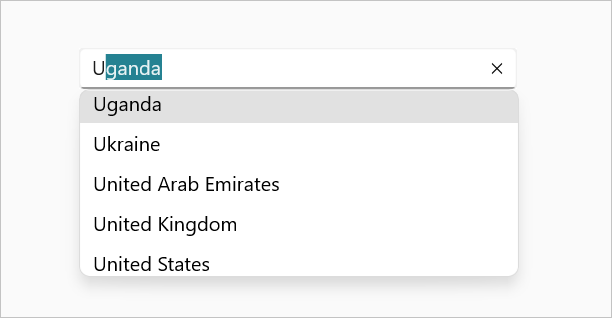
Autocomplete
- Highly optimized to load and populate suggestions quickly, even from large amounts of data.
- Built-in text search with
StartsWithandContainsmodes. - Highlight the matched text in the suggestion list.
- Multi-selection support with tokens or delimiter-separated text.
- Customizable drop-down, and clear button.
ComboBox
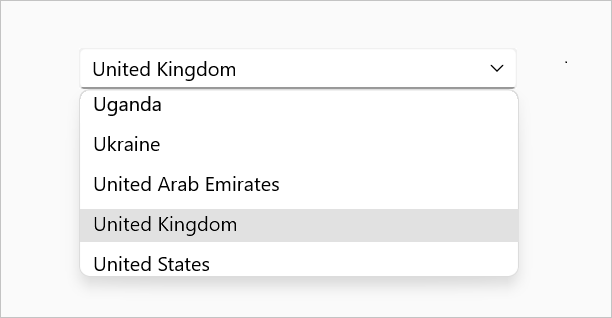
- Editable (type to search) or non-editable (pick from the list) modes.
- Data binding to any
IEnumerablecollection. - Clear button and drop-down button customization.
- Search and highlight matching items as the user types.
- Flexible drop-down sizing and placement.
Rating
- Configure the number of items to display, and the item size and spacing.
- Rated, unrated, and hover shapes, with custom item templates.
- Value changed events for reacting to user input.
- Read-only and disabled support.

ColorPicker
- Pick colors using a hue spectrum, hue slider, or a predefined palette.
- Inline mode support allows embedding the color picker directly within the UI layout.
- Recent colors and a customizable set of default palette colors.
ColorSelectedandColorChangingevents for live preview.
Numeric Entry
- Parse, format, and validate numbers with culture support.
- Up-down buttons for incrementing and decrementing values.
- Validate numeric input when focus is lost.
Masked Entry
- Restrict input with mask patterns such as phone numbers and postal codes.
- Prompt characters and validation on lost focus.
- Control how values are stored and displayed, including prompt characters and literals.
More
- Full styling support with built-in light and dark themes.
- Right-to-left (RTL) support, localization, and accessibility.
Supported platforms
| Platform | Target framework |
|---|---|
| Android | net9.0-android, net10.0-android |
| iOS | net9.0-ios, net10.0-ios |
| macOS (Mac Catalyst) | net9.0-maccatalyst, net10.0-maccatalyst |
| Windows | net9.0-windows10.0.19041, net10.0-windows10.0.19041 |
Minimum OS versions follow the .NET MAUI supported platforms.
Installation
.NET CLI
dotnet add package Syncfusion.Maui.Inputs
Package Manager Console
Install-Package Syncfusion.Maui.Inputs
Getting started
1. Register the Syncfusion core handler
In MauiProgram.cs, call ConfigureSyncfusionCore():
using Syncfusion.Maui.Core.Hosting;

public static class MauiProgram
{
    public static MauiApp CreateMauiApp()
    {
        var builder = MauiApp.CreateBuilder();
        builder
            .UseMauiApp<App>()
            .ConfigureSyncfusionCore();

        return builder.Build();
    }
}
2. Create a model and a ViewModel
using System.Collections.ObjectModel;

public class Employee
{
    public string Name { get; set; }
    public string Designation { get; set; }
}

public class EmployeeViewModel
{
    public ObservableCollection<Employee> Employees { get; set; }

    public EmployeeViewModel()
    {
        Employees = new ObservableCollection<Employee>
        {
            new Employee { Name = "Maria Anders", Designation = "Sales Representative" },
            new Employee { Name = "Ana Trujillo", Designation = "Owner" },
            new Employee { Name = "Thomas Hardy", Designation = "Sales Representative" }
        };
    }
}
3. Add an input control to your page
<ContentPage xmlns="http://schemas.microsoft.com/dotnet/2021/maui"
             xmlns:x="http://schemas.microsoft.com/winfx/2009/xaml"
             xmlns:syncfusion="clr-namespace:Syncfusion.Maui.Inputs;assembly=Syncfusion.Maui.Inputs"
             xmlns:local="clr-namespace:YourAppNamespace"
             x:Class="YourAppNamespace.MainPage">

    <ContentPage.BindingContext>
        <local:EmployeeViewModel />
    </ContentPage.BindingContext>

    <syncfusion:SfAutocomplete ItemsSource="{Binding Employees}"
                               DisplayMemberPath="Name" />

</ContentPage>
Run the app. Start typing a name and the Autocomplete shows matching suggestions.
Common scenarios
ComboBox with editing and selection
<syncfusion:SfComboBox ItemsSource="{Binding Employees}"
                       DisplayMemberPath="Name"
                       IsEditable="True" />
Rating
<syncfusion:SfRating Value="3"
                     ItemCount="5" />
ColorPicker
<syncfusion:SfColorPicker ColorMode="Palette" />
Numeric Entry
<syncfusion:SfNumericEntry Value="100" />
Masked Entry
<syncfusion:SfMaskedEntry Mask="(000) 000-0000" />
For more features, see the inputs documentation.
Dependencies
Installing this package also installs the following packages:
Microsoft.Maui.ControlsSyncfusion.Maui.CoreSyncfusion.Maui.ButtonsSyncfusion.Maui.PopupSyncfusion.Maui.SlidersSyncfusion.Maui.ListView
Licensing
This is a commercial product and requires a paid license. You have three options:
- Free Community License: for individual developers and small businesses. Check eligibility
- 30-day free trial: Start a trial
- Commercial license: View pricing
Register your license key
Register the key in MauiProgram.cs before the app is built:
Syncfusion.Licensing.SyncfusionLicenseProvider.RegisterLicense("YOUR_LICENSE_KEY");
For details, see Licensing overview. Use of this package is subject to the Syncfusion EULA.
Support and feedback
- Support tickets: Syncfusion Support Portal
- Community forums: .NET MAUI Forums
- Feature requests and bug reports: Feedback Portal
- Samples: Syncfusion .NET MAUI demos on GitHub
About Syncfusion®
Founded in 2001 and headquartered in Research Triangle Park, N.C., Syncfusion® has more than 26,000+ customers and more than 1 million users, including large financial institutions, Fortune 500 companies, and global IT consultancies.
Today, we provide 1600+ components and frameworks for web (Blazor, ASP.NET Core, ASP.NET MVC, ASP.NET WebForms, JavaScript, Angular, React, Vue, and Flutter), mobile (.NET MAUI, Xamarin, Flutter, UWP, and JavaScript), and desktop development (WinForms, WPF, WinUI, Flutter and UWP). We provide ready-to-deploy enterprise software for dashboards, reports, data integration, and big data processing. Many customers have saved millions in licensing fees by deploying our software.
[email protected] | www.syncfusion.com | Toll Free: 1-888-9 DOTNET
Changes from Previous Version
Adoption Assessment
A verified publisher signal is available. Assess fit from the package's supported frameworks, license and dependency graph rather than popularity alone.
Related Guides & Workflows
Learn how to evaluate, integrate, or audit this package in your .NET project.