This package provides the functionality to utilize the features of Syncfusion® Blazor SpreadSheet component and more.
Install
| Product | Versions |
|---|---|
| .NET |
README
Syncfusion® Blazor Spreadsheet Component
A high‑performance Blazor Spreadsheet Component for creating, viewing, editing, and analyzing data within Blazor applications. It provides a comprehensive set of Excel‑like features such as formulas, formatting, data manipulation, sorting, and filtering, and is optimized for seamless integration with both Blazor Server and Blazor WebAssembly environments.
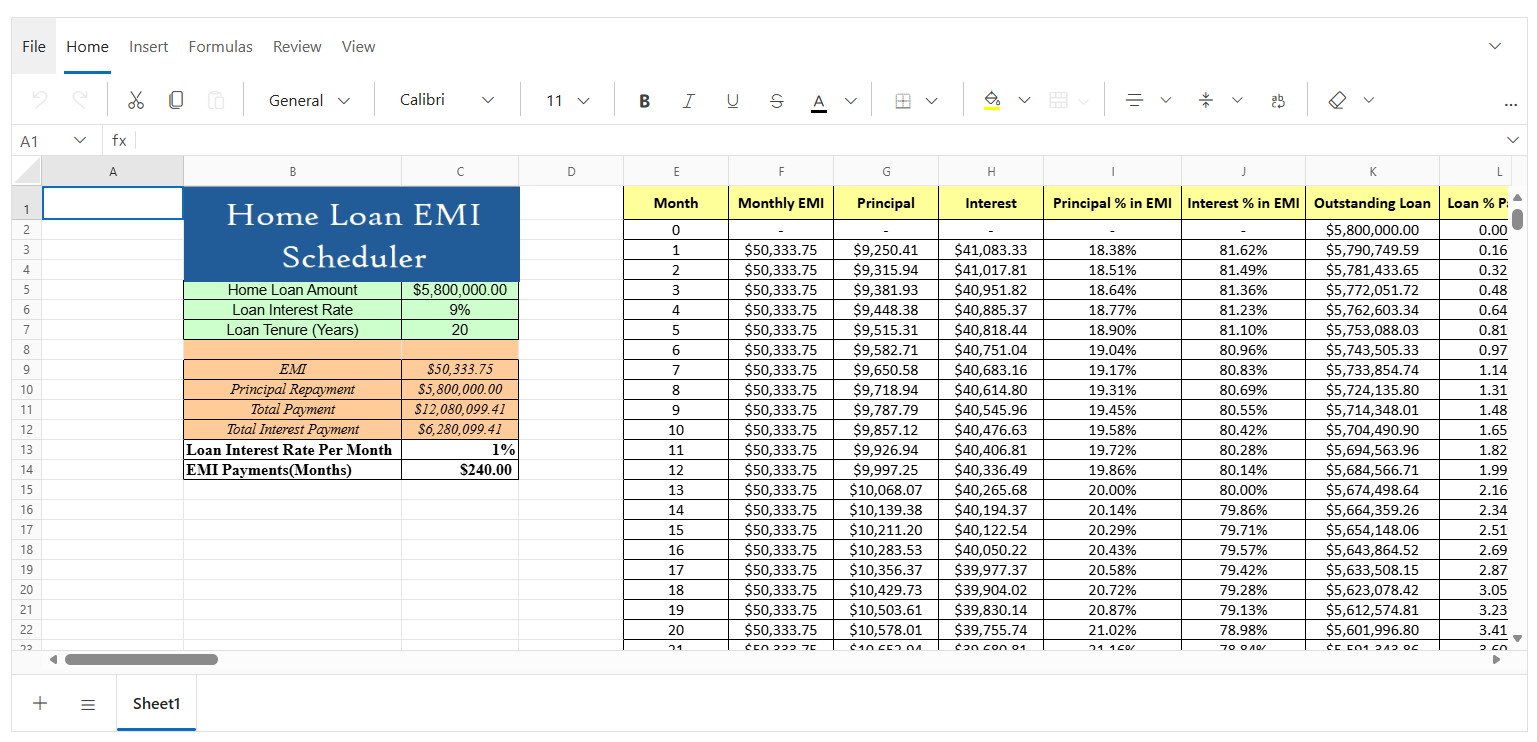
Key features
- Editing - Enables dynamic cell editing with support for direct in-cell editing and formula bar-based editing.
- Selection - Supports selection of individual cells, rows, columns, and ranges using mouse and keyboard interactions.
- Open and Save - Allows opening Excel files (.xlsx, .xls) and saving data as Excel (.xlsx) with Base64 loading and local file support.
- Clipboard - Provides cut, copy, and paste operations with compatibility for external clipboard content from Excel and Google Sheets.
- Formulas - Includes a built-in calculation engine with predefined formulas, named ranges, and automatic or manual calculation modes.
- Cell Formatting - Offers rich formatting options such as fonts, colors, borders, alignment, and text styles for enhanced data presentation.
- Sorting - Enables ascending and descending sorting for single columns to quickly organize data.
- Filtering - Allows filtering rows using text, number, and date filters with custom filter conditions.
- Hyperlink - Supports adding hyperlinks to external URLs or internal cell references across the same or different worksheets.
- Undo & Redo - Provides undo and redo operations with history tracking up to 25 actions for easy corrections.
- Protection - Enables worksheet and workbook protection with password support, range-level unlocking, and configurable permissions.
- Accessibility - Includes built-in accessibility support with keyboard navigation, ARIA attributes, and screen reader compatibility.
Add stylesheet and script references
- For Blazor Web App / Blazor Server App,add these to
Components/App.razororApp.razorfile. - For Blazor WebAssembly App,add these to
wwwroot/index.htmlfile.
<link href="_content/Syncfusion.Blazor.Themes/bootstrap5.css" rel="stylesheet" />
<script src="_content/Syncfusion.Blazor.Spreadsheet/scripts/syncfusion-blazor-spreadsheet.min.js" type="text/javascript"></script>
Quick start
- Register the Syncfusion® Blazor service in the
Program.csfile.
using Syncfusion.Blazor;

builder.Services.AddSyncfusionBlazor();
- Add Blazor Spreadsheet component to your Razor page.
@using Syncfusion.Blazor.Spreadsheet
<SfSpreadsheet DataSource="DataSourceBytes">,
    <SpreadsheetRibbon></SpreadsheetRibbon>
</SfSpreadsheet>

@code {
    public byte[] DataSourceBytes { get; set; }

    protected override void OnInitialized()
    {
        string filePath = "wwwroot/Sample.xlsx";
        DataSourceBytes = File.ReadAllBytes(filePath);
     }
}
Documentation
- Getting Started with Blazor Spreadsheet in Web App
- Getting Started with Blazor Spreadsheet in WebAssembly App
Help resources
Support and feedbacks
- For queries, reach our Syncfusion® support team or post the queries through the community forums.
- Request new feature through Syncfusion® feedback portal.
License
This is a commercial product and requires a paid license for possession or use. Syncfusion® licensed software, including this component, is subject to the terms and conditions of Syncfusion's EULA. You can purchase a license here or start a free 30-day trial here.
About Syncfusion®
Syncfusion® provides 1600+ UI components and frameworks for web, mobile, and desktop development across multiple platforms:
Web: Blazor | ASP.NET Core | ASP.NET MVC | JavaScript | Angular | React | Vue
Mobile: Flutter | Xamarin | UWP
Desktop: WinForms | WPF | WinUI
Learn more at www.syncfusion.com.
[email protected] | Toll Free: 1-888-9-DOTNET
Changes from Previous Version
Adoption Assessment
A verified publisher signal is available. Assess fit from the package's supported frameworks, license and dependency graph rather than popularity alone.
Related Guides & Workflows
Learn how to evaluate, integrate, or audit this package in your .NET project.