Syncfusion® Blazor Rich Text Editor component for composing and formatting HTML content in .NET Blazor apps. Supports toolbar, markdown, paste cleanup, formats, and extensible plugins.
Install
| Product | Versions |
|---|---|
| .NET |
README
Syncfusion® Blazor Rich Text Editor
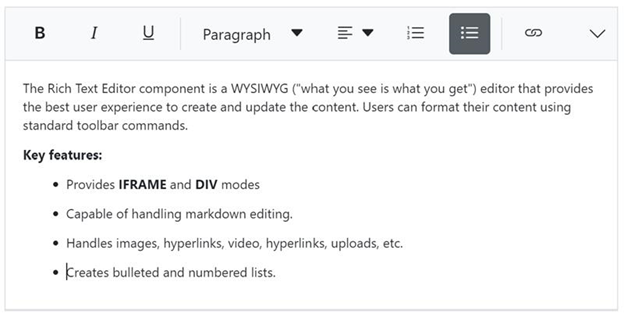
Feature-rich WYSIWYG HTML and Markdown editor for creating and formatting rich content in Blazor applications.
Overview
The Blazor Rich Text Editor is a powerful WYSIWYG editor for creating blogs, forum posts, notes, comments, messaging applications, and support tickets. It provides comprehensive formatting tools, supports both HTML and Markdown modes, and returns valid markup for seamless content integration.
Key features
- Dual editing modes - HTML and Markdown (MD) editing with mode switching
- Rich formatting tools - Text formatting, fonts, colors, alignment, and styles
- Insert capabilities - Images, links, tables, lists, code blocks, and media
- Toolbar customization - Configurable toolbar with custom tools and commands
- Table support - Create and edit tables with cell merging and formatting
- Image management - Upload, resize, and position images with drag-and-drop
- Link insertion - Insert hyperlinks and email links with validation
- Paste cleanup - Smart paste from Word and other sources with formatting cleanup
- Undo/Redo - Full undo and redo support with history management
- Full-screen mode - Distraction-free editing experience
- Character and word count - Track content length in real-time
- Import/Export - Import Word documents and export content
- Responsive design - Touch-friendly interface for mobile devices
- Inline and iframe modes - Flexible rendering options
- Custom formatting - Apply custom CSS classes and inline styles
- Accessibility - WCAG 2.2 compliant with keyboard shortcuts and screen reader support
- RTL support - Right-to-left language compatibility
- Themes - Multiple built-in themes and custom styling
System Requirements
- .NET 8.0 or later (Blazor Server, Blazor Web App, Blazor WebAssembly, Blazor Hybrid)
- See full requirements: System Requirements
Installation
.NET CLI
dotnet add package Syncfusion.Blazor.RichTextEditor
dotnet add package Syncfusion.Blazor.Themes
Package Manager Console
Install-Package Syncfusion.Blazor.RichTextEditor
Install-Package Syncfusion.Blazor.Themes
Add stylesheet and script references
- For Blazor Server App / Blazor Web App, add these to
Components/App.razororApp.razorfile. - For Blazor WebAssembly App, add these to
wwwroot/index.htmlfile.
<link href="_content/Syncfusion.Blazor.Themes/bootstrap5.css" rel="stylesheet" />
<script src="_content/Syncfusion.Blazor.RichTextEditor/scripts/sf-richtexteditor.min.js" type="text/javascript"></script>
Quick start
- Register the Syncfusion® Blazor services in the
Program.csfile.
using Syncfusion.Blazor;

builder.Services.AddSyncfusionBlazor();
- Add Blazor Rich Text Editor Component to your Razor page.
@using Syncfusion.Blazor.RichTextEditor

<SfRichTextEditor></SfRichTextEditor>
- Custom Toolbar Configuration
Configure toolbar with specific tools:
@using Syncfusion.Blazor.RichTextEditor

<SfRichTextEditor @bind-Value="@content">
    <RichTextEditorToolbarSettings Items="@tools" />
</SfRichTextEditor>

@code {
    private string content = "<p>Start typing...</p>";

    private List<ToolbarItemModel> tools = new List<ToolbarItemModel>()
    {
        new ToolbarItemModel() { Command = ToolbarCommand.Bold },
        new ToolbarItemModel() { Command = ToolbarCommand.Italic },
        new ToolbarItemModel() { Command = ToolbarCommand.Underline },
        new ToolbarItemModel() { Command = ToolbarCommand.Separator },
        new ToolbarItemModel() { Command = ToolbarCommand.Formats },
        new ToolbarItemModel() { Command = ToolbarCommand.Alignments },
        new ToolbarItemModel() { Command = ToolbarCommand.OrderedList },
        new ToolbarItemModel() { Command = ToolbarCommand.UnorderedList },
        new ToolbarItemModel() { Command = ToolbarCommand.Separator },
        new ToolbarItemModel() { Command = ToolbarCommand.CreateLink },
        new ToolbarItemModel() { Command = ToolbarCommand.Image },
        new ToolbarItemModel() { Command = ToolbarCommand.Separator },
        new ToolbarItemModel() { Command = ToolbarCommand.Undo },
        new ToolbarItemModel() { Command = ToolbarCommand.Redo }
    };
}
- Markdown Mode
Enable Markdown editing:
@using Syncfusion.Blazor.RichTextEditor

<SfRichTextEditor EditorMode="EditorMode.Markdown" @bind-Value="@markdownContent">
    <RichTextEditorToolbarSettings Items="@markdownTools" />
</SfRichTextEditor>

@code {
    private string markdownContent = "# Hello Markdown\n\nThis is **bold** and this is *italic*.";

    private List<ToolbarItemModel> markdownTools = new List<ToolbarItemModel>()
    {
        new ToolbarItemModel() { Command = ToolbarCommand.Bold },
        new ToolbarItemModel() { Command = ToolbarCommand.Italic },
        new ToolbarItemModel() { Command = ToolbarCommand.StrikeThrough },
        new ToolbarItemModel() { Command = ToolbarCommand.Separator },
        new ToolbarItemModel() { Command = ToolbarCommand.Formats },
        new ToolbarItemModel() { Command = ToolbarCommand.OrderedList },
        new ToolbarItemModel() { Command = ToolbarCommand.UnorderedList },
        new ToolbarItemModel() { Command = ToolbarCommand.Separator },
        new ToolbarItemModel() { Command = ToolbarCommand.CreateLink },
        new ToolbarItemModel() { Command = ToolbarCommand.Image }
    };
}
Documentation
- Getting Started with Blazor Web App
- Getting Started with Blazor WebAssembly App
- Feature Overview
- API Reference
- Live Demos
- Video Tutorials
Support
- Contact Support - Submit a support ticket
- Community Forums - Blazor Forums
- Feature Requests - Feedback Portal
License
This is a commercial product and requires a paid license for use.
About Syncfusion®
Syncfusion® is a provider of enterprise software components and frameworks. We offer 1600+ components and frameworks for web (Blazor, ASP.NET Core, ASP.NET MVC, ASP.NET WebForms, JavaScript, Angular, React, Vue, and Flutter), mobile (Flutter and JavaScript), and desktop development (WinForms, WPF, WinUI, .NET MAUI, and Flutter).
[email protected] | www.syncfusion.com | 1-888-9-DOTNET
Changes from Previous Version
Adoption Assessment
A verified publisher signal is available. Assess fit from the package's supported frameworks, license and dependency graph rather than popularity alone.
Related Guides & Workflows
Learn how to evaluate, integrate, or audit this package in your .NET project.