Syncfusion® Blazor Ribbon component provides a Microsoft Office-style ribbon interface for organizing complex commands and tools. Features include customizable tabs, groups, items with icons and labels, dropdown menus, split buttons, and quick access toolbar for professional application interfaces in Blazor applications.
Install
| Product | Versions |
|---|---|
| .NET |
README
Syncfusion® Blazor Ribbon Component
The Syncfusion® Blazor Ribbon Component provides a Microsoft Office-style ribbon interface for organizing and presenting application commands. It delivers a structured, intuitive UI with customizable tabs, groups, and buttons for improved user experience and efficient command access in Blazor applications.
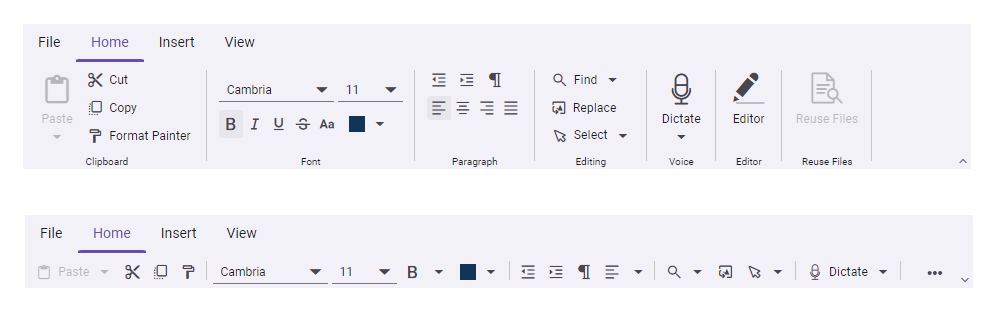
Key fatures
- Customizable Tabs and Groups – Organize commands into logical tabs and groups
- Rich Button Types – Regular buttons, split buttons, and dropdown menus
- Icons and Labels – Support for icons and custom labels on ribbon items
- Responsive Design – Adapts to different screen sizes and orientations
- Keyboard Navigation – Full keyboard support for accessibility
- Template Support – Custom templates for ribbon items and content
- Command Binding – Easy binding to application commands and events
Add stylesheet and script references
- For Blazor Server App / Blazor Web App, add these to
Components/App.razororApp.razorfile. - For Blazor WebAssembly App, add these to
wwwroot/index.htmlfile.
<link href="_content/Syncfusion.Blazor.Themes/bootstrap5.css" rel="stylesheet" />
<script src="_content/Syncfusion.Blazor.Core/scripts/syncfusion-blazor.min.js" type="text/javascript"></script>
Quick start
- Register the Syncfusion® Blazor services in the
Program.csfile.
using Syncfusion.Blazor;

builder.Services.AddSyncfusionBlazor();
- Add Blazor Ribbon component to your Razor page.
<SfRibbon>
    <RibbonTabs>
        <RibbonTab HeaderText="Home"></RibbonTab>
    </RibbonTabs>
</SfRibbon>
Documentation
- Getting Started with Blazor Web App
- Getting Started with Blazor WebAssembly App
- API Reference
- Feature Overview
- Live Demos
Support
License
This is a commercial product and requires a paid license for possession or use. Review the Syncfusion® EULA.
About Syncfusion®
Syncfusion® provides 1600+ UI components and frameworks for web, mobile, and desktop development across multiple platforms:
Web: Blazor | ASP.NET Core | ASP.NET MVC | JavaScript | Angular | React | Vue
Mobile: Flutter | UWP | JavaScript
Learn more at www.syncfusion.com.
[email protected] | Toll Free: 1-888-9-DOTNET
Changes from Previous Version
Adoption Assessment
A verified publisher signal is available. Assess fit from the package's supported frameworks, license and dependency graph rather than popularity alone.
Related Guides & Workflows
Learn how to evaluate, integrate, or audit this package in your .NET project.