Syncfusion® Blazor Kanban component for building workflow boards in .NET Blazor apps. Supports drag-and-drop cards, swimlanes, filtering, card templates, and dialog editing.
Install
| Product | Versions |
|---|---|
| .NET |
README
Syncfusion Blazor Kanban
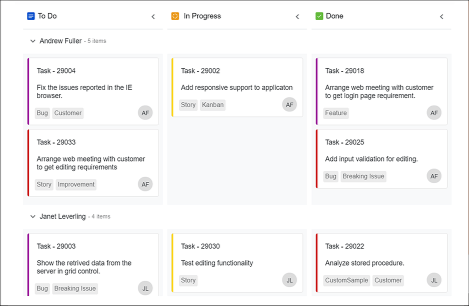
The Blazor Kanban is a powerful workflow management component for building interactive kanban boards in Blazor applications with drag-and-drop cards, swimlanes, and customizable columns.
Using this package with an AI coding agent
Before generating Syncfusion code, ask your AI coding agent to run the Syncfusion setup using the following prompt:
Set up this project for Syncfusion before generating code. Fetch and follow the official instructions at https://ai.syncfusion.com, then report the detected platform, installed skill pack, MCP status, and any required licensing action.The setup detects your project's platform and loads the appropriate Syncfusion skill pack. No Syncfusion account or MCP key is required to install or read Syncfusion agent skills.
Platform reference: https://ai.syncfusion.com/blazor/llms.txt
Key features
- Kanban Board Layout: Multi-column board for visualizing workflow stages
- Drag and Drop: Intuitive drag-drop to move cards between columns
- Swimlanes: Group cards by user, priority, or custom criteria
- Card Templates: Customizable card layouts with rich content support
- Filtering and Searching: Filter cards by text, status, or custom properties
- Dialog Editing: Edit card details with modal dialogs or inline editing
- Stacked Headers: Group columns with hierarchical headers
- Key Bindings: Keyboard shortcuts for quick navigation and editing
- Responsive Design: Mobile-friendly interface with touch support
Supported Platforms
- Blazor Server (.NET 8.0 and later)
- Blazor WebAssembly (.NET 8.0 and later)
- Blazor Hybrid (.NET 8.0 and later)
See System Requirements for detailed compatibility information.
Installation
Install the Kanban package and the themes package, which provides the stylesheets referenced below:
dotnet add package Syncfusion.Blazor.Kanban
dotnet add package Syncfusion.Blazor.Themes
Add stylesheet and script references
- For Blazor Web App / Blazor Server App, add these to
Components/App.razororApp.razorfile. - For Blazor WebAssembly App, add these to
wwwroot/index.htmlfile.
<link href="_content/Syncfusion.Blazor.Themes/fluent2.css" rel="stylesheet" />
<script src="_content/Syncfusion.Blazor.Core/scripts/syncfusion-blazor.min.js" type="text/javascript"></script>
Quick start
- Register the Syncfusion Blazor service in the
Program.csfile.
using Syncfusion.Blazor;

builder.Services.AddSyncfusionBlazor();
- Add Blazor Kanban component to your Razor page.
@using Syncfusion.Blazor.Kanban

<SfKanban TValue="TasksModel" KeyField="Status" DataSource="Tasks">
    <KanbanColumns>
        <KanbanColumn HeaderText="To Do" KeyField="@(new List<string>() { "Open" })"></KanbanColumn>
        <KanbanColumn HeaderText="In Progress" KeyField="@(new List<string>() { "InProgress" })"></KanbanColumn>
        <KanbanColumn HeaderText="Testing" KeyField="@(new List<string>() { "Testing" })"></KanbanColumn>
        <KanbanColumn HeaderText="Done" KeyField="@(new List<string>() { "Close" })"></KanbanColumn>
    </KanbanColumns>
    <KanbanCardSettings HeaderField="Title" ContentField="Summary"></KanbanCardSettings>
</SfKanban>

@code {
    public class TasksModel
    {
        public string? Id { get; set; }
        public string? Title { get; set; }
        public string? Status { get; set; }
        public string? Summary { get; set; }
    }

    public List<TasksModel> Tasks = new List<TasksModel>()
    {
        new TasksModel { Id = "Task 1", Title = "BLAZ-29001", Status = "Open", Summary = "Analyze the new requirements gathered from the customer." },
        new TasksModel { Id = "Task 2", Title = "BLAZ-29002", Status = "Open", Summary = "Show the retrieved data from the server in grid control." },
        new TasksModel { Id = "Task 3", Title = "BLAZ-29003", Status = "InProgress", Summary = "Improve application performance" },
        new TasksModel { Id = "Task 4", Title = "BLAZ-29004", Status = "Testing", Summary = "Fix the issues reported by the customer." },
        new TasksModel { Id = "Task 5", Title = "BLAZ-29005", Status = "Testing", Summary = "Fix the issues reported in Safari browser." },
        new TasksModel { Id = "Task 6", Title = "BLAZ-29006", Status = "Close", Summary = "Analyze SQL server 2008 connection." },
        new TasksModel { Id = "Task 7", Title = "BLAZ-29007", Status = "Close", Summary = "Analyze grid control." },
        new TasksModel { Id = "Task 8", Title = "BLAZ-29008", Status = "Close", Summary = "Stored procedure for initial data binding of the grid." }
    };
}
Documentation
- Getting Started with Blazor Web App
- Getting Started with WebAssembly
- API Reference
- Live Demos
- Feature Overview
Support
License
This is a commercial product and requires a paid license for possession or use. Review the Syncfusion EULA.
About Syncfusion
Syncfusion provides 1600+ UI components and frameworks for web, mobile, and desktop development across multiple platforms:
Web: Blazor | ASP.NET Core | ASP.NET MVC | JavaScript | Angular | React | Vue
Desktop: WinForms | WPF | WinUI
Learn more at www.syncfusion.com.
[email protected] | Toll Free: 1-888-9-DOTNET
Changes from Previous Version
Adoption Assessment
A verified publisher signal is available. Assess fit from the package's supported frameworks, license and dependency graph rather than popularity alone.
Related Guides & Workflows
Learn how to evaluate, integrate, or audit this package in your .NET project.