Syncfusion® Blazor Kanban component for building workflow boards in .NET Blazor apps. Supports drag-and-drop cards, swimlanes, filtering, card templates, and dialog editing.
Install
| Product | Versions |
|---|---|
| .NET |
README
Syncfusion® Blazor Kanban
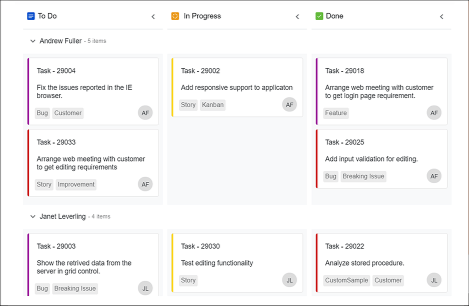
Flexible task management and workflow visualization component for Blazor applications. Organize work across multiple stages with drag-and-drop cards, swimlanes, card editing and sorting features.
Key features
- Kanban Board Layout: Multi-column board for visualizing workflow stages
- Drag and Drop: Intuitive drag-drop to move cards between columns
- Swimlanes: Group cards by user, priority, or custom criteria
- Card Templates: Customizable card layouts with rich content support
- Filtering and Searching: Filter cards by text, status, or custom properties
- Dialog Editing: Edit card details with modal dialogs or inline editing
- Stacked Headers: Group columns with hierarchical headers
- Key Bindings: Keyboard shortcuts for quick navigation and editing
- Responsive Design: Mobile-friendly interface with touch support
Add stylesheet and script references
- For Blazor Web App / Blazor Server App, add these to
Components/App.razororApp.razorfile. - For Blazor WebAssembly App, add these to
wwwroot/index.htmlfile.
<link href="_content/Syncfusion.Blazor.Themes/bootstrap5.css" rel="stylesheet" />
<script src="_content/Syncfusion.Blazor.Core/scripts/syncfusion-blazor.min.js" type="text/javascript"></script>
Quick start
- Register the Syncfusion® Blazor service in the
Program.csfile.
using Syncfusion.Blazor;

builder.Services.AddSyncfusionBlazor();
- Add Blazor Kanban component to your Razor page.
@using Syncfusion.Blazor.Kanban

<SfKanban TValue="TasksModel" KeyField="Status" DataSource="Tasks">
    <KanbanColumns>
        <KanbanColumn HeaderText="To Do" KeyField="@(new List<string>() {"Open"})"></KanbanColumn>
        <KanbanColumn HeaderText="In Progress" KeyField="@(new List<string>() {"InProgress"})"></KanbanColumn>
        <KanbanColumn HeaderText="Testing" KeyField="@(new List<string>() {"Testing"})"></KanbanColumn>
        <KanbanColumn HeaderText="Done" KeyField="@(new List<string>() {"Close"})"></KanbanColumn>
    </KanbanColumns>
    <KanbanCardSettings HeaderField="Title" ContentField="Summary"></KanbanCardSettings>
</SfKanban>

@code {
    public class TasksModel
    {
        public string Id { get; set; }
        public string Title { get; set; }
        public string Status { get; set; }
        public string Summary { get; set; }
    }

    public List<TasksModel> Tasks = new List<TasksModel>()
    {
        new TasksModel { Id = "Task 1", Title = "BLAZ-29001", Status = "Open", Summary = "Analyze the new requirements gathered from the customer." },
        new TasksModel { Id = "Task 2", Title = "BLAZ-29002", Status = "Open", Summary = "Show the retrieved data from the server in grid control." },
        new TasksModel { Id = "Task 3", Title = "BLAZ-29003", Status = "InProgress", Summary = "Improve application performance" },
        new TasksModel { Id = "Task 4", Title = "BLAZ-29004", Status = "Testing", Summary = "Fix the issues reported by the customer." },
        new TasksModel { Id = "Task 5", Title = "BLAZ-29005", Status = "Testing", Summary = "Fix the issues reported in Safari browser." },
        new TasksModel { Id = "Task 6", Title = "BLAZ-29006", Status = "Close", Summary = "Analyze SQL server 2008 connection." },
        new TasksModel { Id = "Task 7", Title = "BLAZ-29007", Status = "Close", Summary = "Analyze grid control." },
        new TasksModel { Id = "Task 8", Title = "BLAZ-29008", Status = "Close", Summary = "Stored procedure for initial data binding of the grid." }
    };
}
Documentation
- Getting Started with Blazor Web App
- Getting Started with WebAssembly
- API Reference
- Live Demos
- Feature Overview
Support
License
This is a commercial product and requires a paid license for possession or use. Review the Syncfusion® EULA.
About Syncfusion®
Syncfusion® provides 1600+ UI components and frameworks for web, mobile, and desktop development across multiple platforms:
Web: Blazor | ASP.NET Core | ASP.NET MVC | JavaScript | Angular | React | Vue
Desktop: WinForms | WPF | WinUI
Learn more at www.syncfusion.com.
[email protected] | Toll Free: 1-888-9-DOTNET
Changes from Previous Version
Adoption Assessment
A verified publisher signal is available. Assess fit from the package's supported frameworks, license and dependency graph rather than popularity alone.
Related Guides & Workflows
Learn how to evaluate, integrate, or audit this package in your .NET project.