This package contains the Syncfusion® Blazor Gantt component.
Install
| Product | Versions |
|---|---|
| .NET |
README
Syncfusion Blazor Gantt Chart
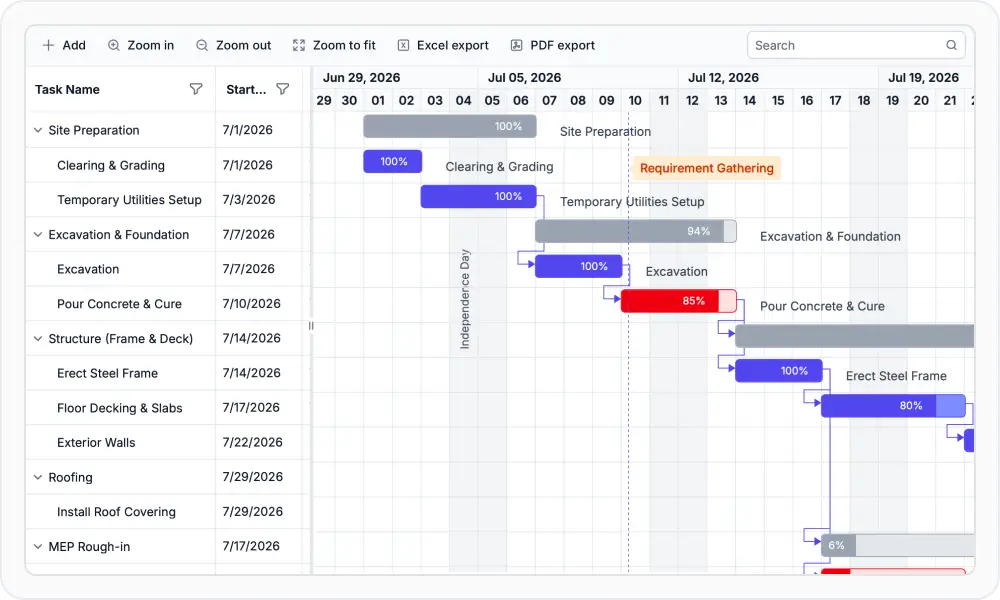
The Blazor Gantt Chart is a professional project planning and scheduling component for Blazor applications. Display and manage hierarchical tasks with timelines, resource allocation, dependencies, and Gantt chart visualizations.
Using this package with an AI coding agent
Before generating Syncfusion code, ask your AI coding agent to run the Syncfusion setup using the following prompt:
Set up this project for Syncfusion before generating code. Fetch and follow the official instructions at https://ai.syncfusion.com, then report the detected platform, installed skill pack, MCP status, and any required licensing action.The setup detects your project's platform and loads the appropriate Syncfusion skill pack. No Syncfusion account or MCP key is required to install or read Syncfusion agent skills.
Platform reference: https://ai.syncfusion.com/blazor/llms.txt
Key Features
- Task Management: Create, edit, and delete tasks with hierarchical (parent/child) structure.
- Timeline View: Interactive Gantt chart with customizable timeline scales (hour/day/week/month) and zoom levels.
- Resource Allocation: Assign resources to tasks, view allocations, and support basic resource leveling.
- Dependencies: Define and visualize task dependencies and relationships (FS/SS/FF/SF).
- Scheduling: Automatic date calculation and recalculation based on durations, dependencies, and project constraints.
- Milestone Tracking: Mark and track important project milestones
- Drag and Drop: Reschedule and reorder tasks via drag-and-drop with touch and keyboard-friendly alternatives.
- Filtering and Sorting: Filter and sort tasks by status, resource, date range, or custom criteria.
- Export: Export project data to Excel, CSV, PDF (and other formats) with configurable export options.
- Timezone: Configure task scheduling and date-time display using a specified timezone, with automatic conversion and daylight saving time (DST) adjustments.
System Requirements
- .NET 8.0 or later (Blazor Server, Blazor Web App, Blazor WebAssembly, Blazor Hybrid)
- See full requirements: System Requirements
Installation
Install the Gantt package and the themes package, which provides the stylesheets referenced below:
dotnet add package Syncfusion.Blazor.Gantt
dotnet add package Syncfusion.Blazor.Themes
Add Stylesheet and Script References
For Blazor Web App / Blazor Server, add these to Components/App.razor or App.razor. For Blazor WebAssembly, add these to wwwroot/index.html:
<link href="_content/Syncfusion.Blazor.Themes/fluent2.css" rel="stylesheet" />
<script src="_content/Syncfusion.Blazor.Core/scripts/syncfusion-blazor.min.js" type="text/javascript"></script>
Quick Start
- Register the Syncfusion Blazor service in
Program.cs:
using Syncfusion.Blazor;

builder.Services.AddSyncfusionBlazor();
- Add Blazor Gantt Chart component to your Razor page:
@using Syncfusion.Blazor.Gantt

<div class="control-section e-gantt-eventmarkers-sample">
    <SfGantt DataSource="@TaskCollection" Height="450px" Width="1200px" ProjectStartDate="@(new DateTime(2026, 3, 27))" ProjectEndDate="@(new DateTime(2026, 7, 6))" TreeColumnIndex="1" ScrollToTaskbarOnClick="true">
        <GanttTaskFields Id="TaskId" Name="TaskName" StartDate="StartDate" EndDate="EndDate" Progress="Progress" ParentID="ParentId" Indicators="Indicators" Dependency="Predecessor">
        </GanttTaskFields>
        <GanttColumns>
            <GanttColumn Field="TaskId" HeaderText="Task Id"></GanttColumn>
            <GanttColumn Field="TaskName" HeaderText="Task Name" ClipMode="Syncfusion.Blazor.Grids.ClipMode.EllipsisWithTooltip" Width="280px"></GanttColumn>
            <GanttColumn Field="StartDate" HeaderText="Start Date"></GanttColumn>
            <GanttColumn Field="EndDate" HeaderText="End Date"></GanttColumn>
            <GanttColumn Field="Predecessor" HeaderText="Dependency"></GanttColumn>
            <GanttColumn Field="Progress" HeaderText="Progress"></GanttColumn>
        </GanttColumns>
        <GanttEventMarkers>
            <GanttEventMarker Day="@ResearchPhaseDate" Label="Research phase" CssClass="e-custom-event-marker"></GanttEventMarker>
        </GanttEventMarkers>
        <GanttSplitterSettings Position="28%"></GanttSplitterSettings>
        <GanttLabelSettings LeftLabel="TaskName" TValue="EventData.TaskData"></GanttLabelSettings>
    </SfGantt>
</div>
@code {
    internal List<EventData.TaskData> TaskCollection { get; set; } = new List<EventData.TaskData>();
    public DateTime ResearchPhaseDate { get; set; } = new DateTime(2026, 04, 09);
    /// <summary>
    /// Initializes the sample by loading task data for the Gantt chart.
    /// </summary>
    protected override async Task OnInitializedAsync()
    {
        TaskCollection = EventData.GetTaskCollection();
        await Task.CompletedTask.ConfigureAwait(true);
    }

    public static class EventData
    {
        internal sealed class TaskData
        {
            public int TaskId { get; set; }
            public string TaskName { get; set; } = string.Empty;
            public DateTime StartDate { get; set; }
            public DateTime EndDate { get; set; }
            public int Progress { get; set; }
            public int? ParentId { get; set; }
            public string Predecessor { get; set; } = string.Empty;
            public List<GanttIndicator>? Indicators { get; set; }
        }
        /// <summary>
        /// Generates and returns a collection of Gantt task data.
        /// </summary>
        internal static List<TaskData> GetTaskCollection()
        {
            List<TaskData> Tasks = new List<TaskData>() {
                new TaskData() { TaskId = 1, TaskName = "Product concept", StartDate = new DateTime(2026, 04, 02), EndDate = new DateTime(2026, 04, 08) },
                new TaskData() { TaskId = 2, TaskName = "Defining the product usage", StartDate = new DateTime(2026, 04, 02), EndDate = new DateTime(2026, 04, 08), Progress = 30, ParentId = 1 },
                new TaskData() { TaskId = 3, TaskName = "Defining the target audience", StartDate = new DateTime(2026, 04, 02), EndDate = new DateTime(2026, 04, 04), Progress = 40, ParentId = 1 },
                new TaskData() { TaskId = 4, TaskName = "Prepare product sketch and notes", StartDate = new DateTime(2026, 04, 05), EndDate = new DateTime(2026, 04, 08), Progress = 30, ParentId = 1, Predecessor = "2" },
                new TaskData() { TaskId = 5, TaskName = "Concept approval", StartDate = new DateTime(2026, 04, 08), EndDate = new DateTime(2026, 04, 08), Predecessor = "3,4", Indicators = new List<GanttIndicator>() { new GanttIndicator() { Name = "Design phase", IconClass = "e-btn-icon e-notes-info e-icons e-icon-left e-gantt e-notes-info::after", Date = new DateTime(2026, 04, 10), Tooltip = "Design phase" }, } },
                new TaskData() { TaskId = 6, TaskName = "Market research", StartDate = new DateTime(2026, 04, 09), EndDate = new DateTime(2026, 04, 18), Progress = 30 },
                new TaskData() { TaskId = 7, TaskName = "Demand analysis", StartDate = new DateTime(2026, 04, 09), EndDate = new DateTime(2026, 04, 12), Progress = 40, ParentId = 6 },
                new TaskData() { TaskId = 8, TaskName = "Customer strength", StartDate = new DateTime(2026, 04, 09), EndDate = new DateTime(2026, 04, 12), Progress = 30, ParentId = 7, Predecessor = "5" },
                new TaskData() { TaskId = 9, TaskName = "Market opportunity analysis", StartDate = new DateTime(2026, 04, 09), EndDate = new DateTime(2026, 04, 12), ParentId = 7, Predecessor = "5" },
                new TaskData() { TaskId = 10, TaskName = "Competitor analysis", StartDate = new DateTime(2026, 04, 15), EndDate = new DateTime(2026, 04, 18), Progress = 30, ParentId = 6, Predecessor = "7,8" },
                new TaskData() { TaskId = 11, TaskName = "Product strength analysis", StartDate = new DateTime(2026, 04, 15), EndDate = new DateTime(2026, 04, 18), Progress = 40, ParentId = 6, Predecessor = "9" },
                new TaskData() { TaskId = 12, TaskName = "Research completed", StartDate = new DateTime(2026, 04, 22), EndDate = new DateTime(2026, 04, 22), Progress = 30, ParentId = 6, Predecessor = "10", Indicators = new List<GanttIndicator>() { new GanttIndicator() { Name = "Research completed", IconClass = "e-btn-icon e-notes-info e-icons e-icon-left e-gantt e-notes-info::after", Date = new DateTime(2026, 04, 23), Tooltip = "Research completed" }, } },
                new TaskData() { TaskId = 13, TaskName = "Product design and development", StartDate = new DateTime(2026, 04, 19), EndDate = new DateTime(2026, 05, 16) },
                new TaskData() { TaskId = 14, TaskName = "Functionality design", StartDate = new DateTime(2026, 04, 19), EndDate = new DateTime(2026, 04, 23), Progress = 30, ParentId = 13, Predecessor = "12" },
                new TaskData() { TaskId = 15, TaskName = "Quality design", StartDate = new DateTime(2026, 04, 19), EndDate = new DateTime(2026, 04, 23), Progress = 40, ParentId = 13, Predecessor = "12" },
                new TaskData() { TaskId = 16, TaskName = "Define reliability", StartDate = new DateTime(2026, 04, 24), EndDate = new DateTime(2026, 04, 25), Progress = 30, ParentId = 13, Predecessor = "15" },
                new TaskData() { TaskId = 17, TaskName = "Identifying raw materials", StartDate = new DateTime(2026, 04, 24), EndDate = new DateTime(2026, 04, 25), ParentId = 13, Predecessor = "15" },
                new TaskData() { TaskId = 18, TaskName = "Define cost plan", StartDate = new DateTime(2026, 04, 26), EndDate = new DateTime(2026, 04, 29), Progress = 30, ParentId = 13, Predecessor = "17" },
                new TaskData() { TaskId = 19, TaskName = "Define manufacturing cost", StartDate = new DateTime(2026, 04, 26), EndDate = new DateTime(2026, 04, 29), Progress = 40, ParentId = 18, Predecessor = "17" },
                new TaskData() { TaskId = 20, TaskName = "Define selling cost", StartDate = new DateTime(2026, 04, 26), EndDate = new DateTime(2026, 04, 29), Progress = 30, ParentId = 18, Predecessor = "17" },
                new TaskData() { TaskId = 21, TaskName = "Development of final design", StartDate = new DateTime(2026, 04, 30), EndDate = new DateTime(2026, 05, 08), ParentId = 13 },
                new TaskData() { TaskId = 22, TaskName = "Develop dimensions and design", StartDate = new DateTime(2026, 04, 30), EndDate = new DateTime(2026, 05, 01), Progress = 30, ParentId = 21, Predecessor = "19,20" },
                new TaskData() { TaskId = 23, TaskName = "Develop designs to meet industry standard", StartDate = new DateTime(2026, 05, 02), EndDate = new DateTime(2026, 05, 03), Progress = 40, ParentId = 21, Predecessor = "22" },
                new TaskData() { TaskId = 24, TaskName = "Include all the details", StartDate = new DateTime(2026, 05, 06), EndDate = new DateTime(2026, 05, 08), Progress = 30, ParentId = 21, Predecessor = "23" },
                new TaskData() { TaskId = 25, TaskName = "CAD - Computer Aided Design", StartDate = new DateTime(2026, 05, 09), EndDate = new DateTime(2026, 05, 13), Predecessor = "24" },
                new TaskData() { TaskId = 26, TaskName = "CAM - Computer Aided Manufacturing", StartDate = new DateTime(2026, 05, 14), EndDate = new DateTime(2026, 05, 16), Progress = 30, Predecessor = "25" },
                new TaskData() { TaskId = 27, TaskName = "Finalize the design", StartDate = new DateTime(2026, 04, 16), EndDate = new DateTime(2026, 04, 16), Progress = 40, Predecessor = "26" },
                new TaskData() { TaskId = 28, TaskName = "Prototype testing", StartDate = new DateTime(2026, 05, 17), EndDate = new DateTime(2026, 05, 22), Progress = 30, Predecessor = "27" },
                new TaskData() { TaskId = 29, TaskName = "Include feedback", StartDate = new DateTime(2026, 05, 17), EndDate = new DateTime(2026, 05, 22), Predecessor = "28ss", Indicators = new List<GanttIndicator>() { new GanttIndicator() { Name = "Production phase", IconClass = "e-btn-icon e-notes-info e-icons e-icon-left e-gantt e-notes-info::after", Date = new DateTime(2026, 05, 26), Tooltip = "Production phase" }, } },
                new TaskData() { TaskId = 30, TaskName = "Manufacturing", StartDate = new DateTime(2026, 05, 23), EndDate = new DateTime(2026, 05, 29), Progress = 30, Predecessor = "28,29" },
                new TaskData() { TaskId = 31, TaskName = "Assembling material into finished goods", StartDate = new DateTime(2026, 05, 30), EndDate = new DateTime(2026, 06, 05), Progress = 40, Predecessor = "30" },
                new TaskData() { TaskId = 32, TaskName = "Final product development", StartDate = new DateTime(2026, 06, 06), EndDate = new DateTime(2026, 06, 13), Progress = 30 },
                new TaskData() { TaskId = 33, TaskName = "Important improvement", StartDate = new DateTime(2026, 06, 06), EndDate = new DateTime(2026, 06, 10), ParentId = 32, Predecessor = "31" },
                new TaskData() { TaskId = 34, TaskName = "Customer testing and feedback", StartDate = new DateTime(2026, 06, 11), EndDate = new DateTime(2026, 06, 13), Progress = 30, ParentId = 32, Predecessor = "33" },
                new TaskData() { TaskId = 35, TaskName = "Final product development", StartDate = new DateTime(2026, 06, 14), EndDate = new DateTime(2026, 06, 19), Progress = 40 },
                new TaskData() { TaskId = 36, TaskName = "Important improvement", StartDate = new DateTime(2026, 06, 14), EndDate = new DateTime(2026, 06, 19), Progress = 30, ParentId = 35, Predecessor = "34" },
                new TaskData() { TaskId = 37, TaskName = "Address any unforeseen issues", StartDate = new DateTime(2026, 06, 14), EndDate = new DateTime(2026, 06, 19), Progress = 30, Predecessor = "36ss", ParentId = 35, Indicators = new List<GanttIndicator>() { new GanttIndicator() { Name = "Sales and Marketing", IconClass = "e-btn-icon e-notes-info e-icons e-icon-left e-gantt e-notes-info::after", Date = new DateTime(2026, 06, 23), Tooltip = "Sales and Marketing" }, } },
                new TaskData() { TaskId = 38, TaskName = "Finalize the product ", StartDate = new DateTime(2026, 06, 20), EndDate = new DateTime(2026, 07, 01), Progress = 40 },
                new TaskData() { TaskId = 39, TaskName = "Branding the product", StartDate = new DateTime(2026, 06, 20), EndDate = new DateTime(2026, 06, 25), Progress = 30, ParentId = 38, Predecessor = "37" },
                new TaskData() { TaskId = 40, TaskName = "Marketing and presales", StartDate = new DateTime(2026, 06, 26), EndDate = new DateTime(2026, 07, 01), ParentId = 38, Predecessor = "39" }
            };
            return Tasks;
        }
    }
}
Documentation
- Getting Started with Blazor Web App
- Getting Started with WebAssembly
- API Reference
- Live Demos
- Feature Overview
Support
Other Popular Blazor Components
Explore other popular Syncfusion® blazor components curated from UI components, standalone SDKs, and document solution suites.
        Blazor DataGrid


        Blazor Charts


        Blazor File Manager


        Blazor Diagram


        Blazor Scheduler


        Blazor Rich Text Editor


        Blazor DOCX Editor


        Blazor Spreadsheet Editor


        Blazor PDF Viewer


        Blazor Map
License
This is a commercial product and requires a paid license for possession or use. Review the Syncfusion EULA.
About Syncfusion
Syncfusion provides 1600+ UI components and frameworks for web, mobile, and desktop development across multiple platforms:
Web: Blazor | ASP.NET Core | ASP.NET MVC | JavaScript | Angular | React | Vue
Desktop: WinForms | WPF | WinUI
Learn more at www.syncfusion.com.
[email protected] | Toll Free: 1-888-9-DOTNET
Changes from Previous Version
Adoption Assessment
A verified publisher signal is available. Assess fit from the package's supported frameworks, license and dependency graph rather than popularity alone.
Related Guides & Workflows
Learn how to evaluate, integrate, or audit this package in your .NET project.