This package contains the Syncfusion® Blazor Gantt component.
Install
| Product | Versions |
|---|---|
| .NET |
README
Syncfusion® Blazor Gantt Chart
Professional project planning and scheduling component for Blazor applications. Display and manage hierarchical tasks with timelines, resource allocation, dependencies, and Gantt chart visualizations.
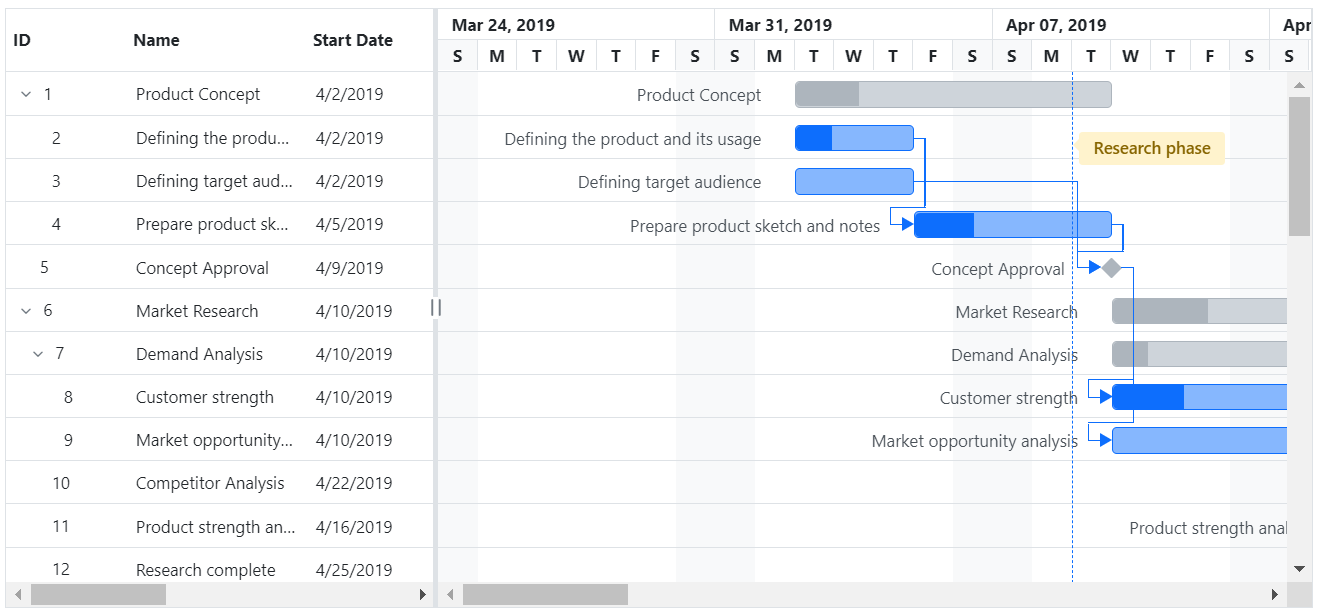
Key Features
- Task Management: Create, edit, and delete tasks with hierarchical structure
- Timeline View: Visual Gantt chart with customizable timeline scales
- Resource Allocation: Assign and manage resources across tasks
- Dependencies: Define and visualize task dependencies and relationships
- Scheduling: Auto-calculate dates based on duration and dependencies
- Milestone Tracking: Mark and track important project milestones
- Drag and Drop: Reschedule tasks by dragging on the timeline
- Filtering and Sorting: Filter tasks by status, resource, or custom criteria
- Export: Export project data to Excel, PDF, and other formats
System Requirements
- .NET 8.0 or later (Blazor Server, Blazor Web App, Blazor WebAssembly, Blazor Hybrid)
- See full requirements: System Requirements
Installation
.NET CLI
dotnet add package Syncfusion.Blazor.Gantt
NuGet Package Manager
Install-Package Syncfusion.Blazor.Gantt
Add Stylesheet and Script References
For Blazor Web App / Blazor Server, add these to Components/App.razor or App.razor. For Blazor WebAssembly, add these to wwwroot/index.html:
<link href="_content/Syncfusion.Blazor.Themes/bootstrap5.css" rel="stylesheet" />
<script src="_content/Syncfusion.Blazor.Core/scripts/syncfusion-blazor.min.js" type="text/javascript"></script>
Quick Start
- Register the Syncfusion® Blazor service in
Program.cs:
using Syncfusion.Blazor;

builder.Services.AddSyncfusionBlazor();
- Add the Gantt Chart component to your Razor page:
@using Syncfusion.Blazor.Gantt

<SfGantt DataSource="@TaskCollection" Height="450px">
    <GanttTaskFields Id="TaskId" Name="TaskName" StartDate="StartDate" EndDate="EndDate" Duration="Duration" Progress="Progress" ParentID="ParentId"/>
    <GanttColumns>
        <GanttColumn Field="TaskId" HeaderText="Task ID" Width="100"/>
        <GanttColumn Field="TaskName" HeaderText="Task Name" Width="250"/>
        <GanttColumn Field="StartDate" HeaderText="Start Date" Format="yMd"/>
        <GanttColumn Field="EndDate" HeaderText="End Date" Format="yMd"/>
        <GanttColumn Field="Duration" HeaderText="Duration"/>
        <GanttColumn Field="Progress" HeaderText="Progress"/>
    </GanttColumns>
</SfGantt>

@code {
    private List<TaskData> TaskCollection = new();

    protected override void OnInitialized()
    {
        TaskCollection = new List<TaskData>
        {
            new TaskData() { TaskId = 1, TaskName = "Project initiation", StartDate = new DateTime(2024, 3, 29), EndDate = new DateTime(2024, 4, 2), Duration = 4 },
            new TaskData() { TaskId = 2, TaskName = "Identify site location", StartDate = new DateTime(2024, 3, 29), EndDate = new DateTime(2024, 3, 29), Duration = 4, Progress = 30, ParentId = 1 },
            new TaskData() { TaskId = 3, TaskName = "Perform soil test", StartDate = new DateTime(2024, 4, 3), EndDate = new DateTime(2024, 4, 4), Duration = 4, ParentId = 1 }
        };
    }

    public class TaskData
    {
        public int TaskId { get; set; }
        public string TaskName { get; set; }
        public DateTime StartDate { get; set; }
        public DateTime EndDate { get; set; }
        public int Duration { get; set; }
        public int Progress { get; set; }
        public int ParentId { get; set; }
    }
}
Documentation
- Getting Started with Blazor Web App
- Getting Started with WebAssembly
- API Reference
- Live Demos
- Feature Overview
Support
License
This is a commercial product and requires a paid license for possession or use. Review the Syncfusion® EULA.
About Syncfusion®
Syncfusion® provides 1600+ UI components and frameworks for web, mobile, and desktop development across multiple platforms:
Web: Blazor | ASP.NET Core | ASP.NET MVC | JavaScript | Angular | React | Vue
Desktop: WinForms | WPF | WinUI
Learn more at www.syncfusion.com.
[email protected] | Toll Free: 1-888-9-DOTNET
Changes from Previous Version
Adoption Assessment
A verified publisher signal is available. Assess fit from the package's supported frameworks, license and dependency graph rather than popularity alone.
Related Guides & Workflows
Learn how to evaluate, integrate, or audit this package in your .NET project.