This package provides the functionality to utilize the features of Syncfusion Blazor AutoComplete, ComboBox, DropDownList, ListBox, and MultiSelect Dropdown.
Install
| Product | Versions |
|---|---|
| .NET |
README
Syncfusion Blazor DropDown Components
This package contains Blazor DropDownList, Blazor MultiSelect Dropdown, Blazor ListBox, Blazor ComboBox and Blazor AutoComplete components for Blazor application.
System Requirements
Blazor DropDownList
The Blazor DropDownList is a quick replacement of the HTML select tags. It has a rich appearance and allows users to select a single value that is non-editable from a list of predefined values. It has several out-of-the-box features, such as data binding, filtering, grouping, UI customization, accessibility, and preselected values.
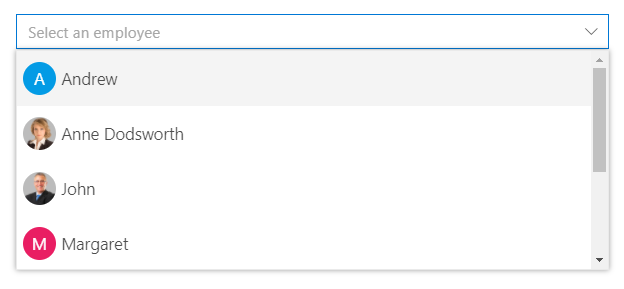
Getting Started
Resources
- Blazor DropDownList Component Features Overview
- Blazor DropDownList Component Documentation
- Blazor DropDownList Component Demos
- Blazor DropDownList Component Video Tutorials
Blazor MultiSelect Dropdown
The Blazor MultiSelect Dropdown is a quick replacement for the HTML select tag for selecting multiple values. HTML MultiSelect Dropdown is a textbox component that allows the user to type or select multiple values from a list of predefined options. It has several out-of-the-box features such as data binding, filtering, grouping, tagging with custom values, and checkbox mode.
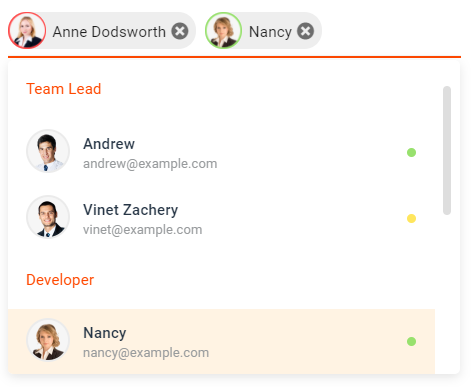
Getting Started
Resources
- Blazor MultiSelect Dropdown Component Features Overview
- Blazor MultiSelect Dropdown Component Documentation
- Blazor MultiSelect Dropdown Component Demos
Blazor ListBox
The Blazor ListBox is a graphical user interface for displaying a list of items with multi-selection options. It has a rich appearance and allows users to select one or more items from the list using checkboxes or keyboard interactions. It has several out-of-the-box features, such as data binding, sorting, grouping, reordering, dragging and dropping, UI customization, and accessibility.
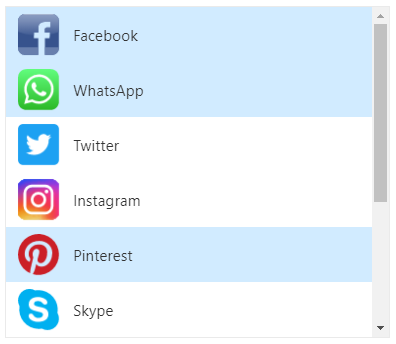
Getting Started
Resources
- Blazor ListBox Component Features Overview
- Blazor ListBox Component Documentation
- Blazor ListBox Component Demos
- Blazor ListBox Component Video Tutorials
Blazor ComboBox
The Blazor ComboBox component is a drop-down list with an editable option that also allows users to choose an option from a predefined pop-up list. It can be used as an alternative to the HTML select tag and has several out-of-the-box features such as data binding, filtering, grouping, cascading, templates, UI customization, pop-up list customization, and more.
Getting Started
Resources
- Blazor ComboBox Component Features Overview
- Blazor ComboBox Component Documentation
- Blazor ComboBox Component Demos
- Blazor ComboBox Component Video Tutorials
Blazor AutoComplete
The Blazor AutoComplete or typeahead is a textbox component that provides a list of suggestions to select from as the user types. It has several out-of-the-box features such as data binding, filtering, grouping, UI customization, accessibility, and more.

Getting Started
Resources
- Blazor AutoComplete Component Features Overview
- Blazor AutoComplete Component Documentation
- Blazor AutoComplete Component Demos
- Blazor AutoComplete Component Video Tutorials
Support and feedback
- For any other queries, reach our Syncfusion support team or post the queries through the community forums.
- Provide feature request through the Syncfusion feedback portal
License
This is a commercial product and requires a paid license for possession or use. Syncfusion’s licensed software, including this component, is subject to the terms and conditions of Syncfusion's EULA. You can purchase a license here or start a free 30-day trial here.
About Syncfusion
Founded in 2001 and headquartered in Research Triangle Park, N.C., Syncfusion has more than 26,000+ customers and more than 1 million users, including large financial institutions, Fortune 500 companies, and global IT consultancies.
Today, we provide 1600+ components and frameworks for web (Blazor, ASP.NET Core, ASP.NET MVC, ASP.NET WebForms, JavaScript, Angular, React, Vue, and Flutter), mobile (Xamarin, Flutter, UWP, and JavaScript), and desktop development (WinForms, WPF, WinUI, Flutter and UWP). We provide ready-to-deploy enterprise software for dashboards, reports, data integration, and big data processing. Many customers have saved millions in licensing fees by deploying our software.
[email protected] | www.syncfusion.com | Toll Free: 1-888-9 DOTNET
Changes from Previous Version
Adoption Assessment
A verified publisher signal is available. Assess fit from the package's supported frameworks, license and dependency graph rather than popularity alone.
Related Guides & Workflows
Learn how to evaluate, integrate, or audit this package in your .NET project.