SerilogTracing
An experimental Serilog extension for producing and capturing hierarchical traces.
Install
| Product | Versions |
|---|---|
| .NET |
README
SerilogTracing
An experimental Serilog extension for producing and capturing hierarchical traces.
This is the logical successor to SerilogTimings, which provides very similar functionality, but emits plain log events rather than hierarchical traces.
What is SerilogTracing?
SerilogTracing integrates Serilog with the System.Diagnostics.Activity* types provided by the .NET BCL. This makes
it possible to:
- Record traces generated using the .NET APIs through Serilog sinks, and
- Generate rich traces using Serilog APIs and idioms, that can still be observed by other consumers of the .NET APIs.
There are two main scenarios where these capabilities combine usefully.
First, at development time, routing trace information through Serilog means that all of the beautiful, developer-friendly Serilog outputs can be used for simple local feedback.
Here's what that looks like, routed through Serilog's console sink:
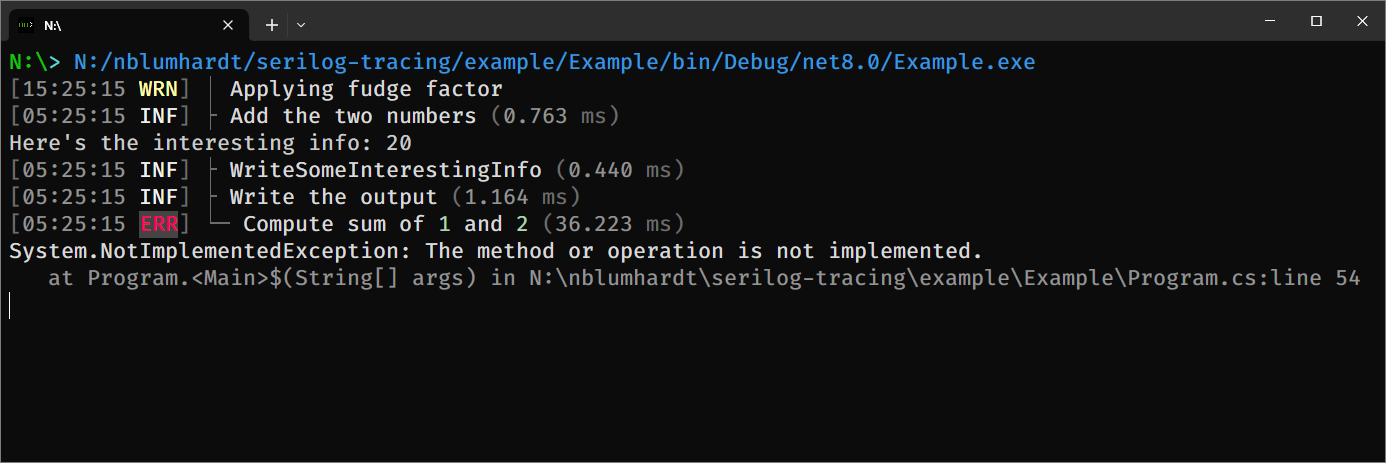
The example is using Serilog's ExpressionTemplate to annotate each span in the trace with timing information. The
layout is fully configurable - check out Program.cs in the included example project - so let your ASCII artistry run
wild!
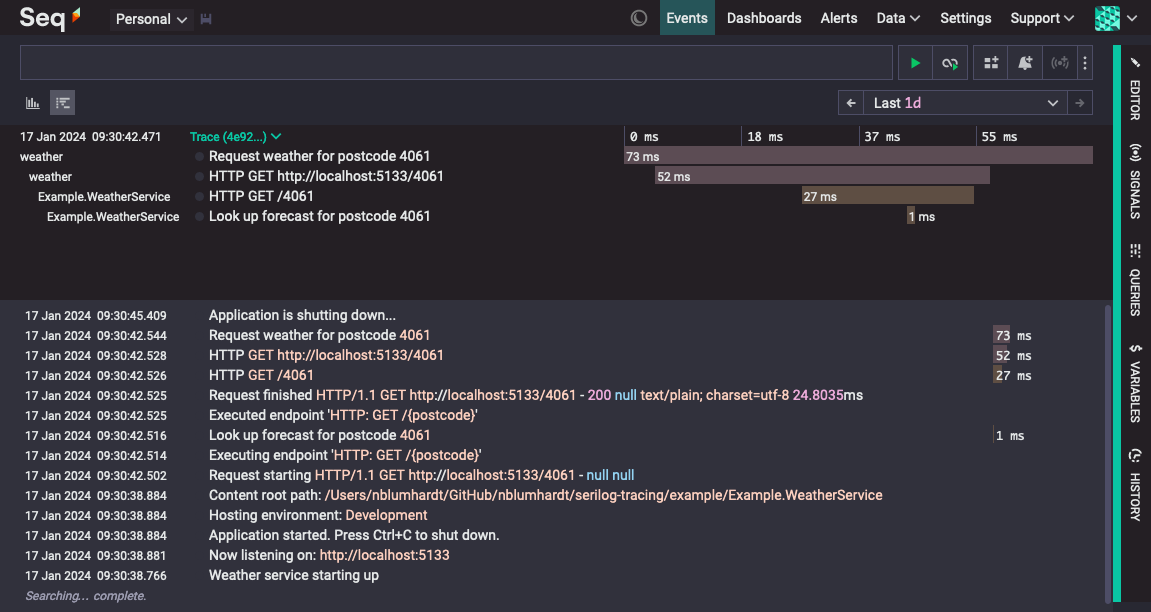
Second, in production, Serilog's existing configuration, enrichment, filtering, formatting, and output facilities can potentially provide a flexible mechanism for emitting trace data to a wide range of targets.
Notably, any system that accepts traces in text or JSON format should be an easy target for SerilogTracing and a
Serilog sink; here's Seq showing traces delivered using the production Serilog.Sinks.Seq package and a custom
ITextFormatter implemented with ExpressionTemplate:
How does it work?
And what do we mean by "tracing"?
A trace is just a collection of spans, and a span is just an event that carries a:
- trace id,
- span id,
- parent span id (optional),
- start time, and
- duration.
SerilogTracing generates spans using extension methods on ILogger:
using var activity = logger.StartActivity("Compute {A} + {B}", a, b);
// ... on `Dispose()` the activity will be recorded as a span
The spans generated by SerilogTracing are converted into Serilog LogEvents and routed through the logger. There's
nothing particularly special about these events, except that they add ParentSpanId and SpanStartTimestamp
properties to represent the parts of a span not already covered by the other parts of the LogEvent.
SerilogTracing needs to hook into the logging pipeline at creation time; currently this must be done using:
Log.Logger = new LoggerConfiguration()
    ... // Other configuration as usual, then:
    .CreateTracingLogger();
In addition to generating spans, SerilogTracing also consumes spans generated elsewhere in an application via the
System.Diagnostics.Activity APIs, such as those produced by ASP.NET Core or HttpClient. Activity sources can be
enabled or disabled using the logger's MinimumLevel.Override settings.
Finally, SerilogTracing includes some examples showing how the resulting LogEvents can be formatted for various
trace-aware outputs.
Starting, enriching, and completing activities
Activities are represented by LoggerActivity instances.
LoggerActivity has a simple lifetime:
- The activity is started using one of the
ILogger.StartActivity()extensions, - Properties are added to the activity using
LoggerActivity.AddProperty(), and - The activity is completed either implicitly, by
IDisposable.Dispose(), or explicitly usingLoggerActivity.Complete().
LoggerActivity.Complete() accepts optional LogEventLevel and Exception arguments.
Displaying output
Use the formatters provides by Serilog.Tracing.Formatting.DefaultFormatting to pretty-print spans as text, or
serialize to JSON.
Configuring the activity listener
Activity sources can be enabled and disabled using the standard MinimumLevel.Override() mechanism.
Status
This project is experimental. It's not a part of Serilog, not maintained by the Serilog maintainers, and might not evolve in any particular way: there's currently no plan to integrate this functionality directly into Serilog. (Having said that, this project is a vehicle to explore those possibilities).
Changes from Previous Version
Adoption Assessment
Assess this package against its supported frameworks, license, maintenance signals and dependency graph before making it a project standard.
Related Guides & Workflows
Learn how to evaluate, integrate, or audit this package in your .NET project.