Prism.Avalonia
Prism.Avalonia is a fully open source version of the Prism guidance originally produced by Microsoft Patterns & Practices. Prism.Avalonia provides an implementation of a collection of design patterns that are helpful in writing well structured, maintainable, and testable XAML applications, including MVVM, dependency injection, commanding, event aggregation, and more. Prism's core functionality is a shared library targeting the .NET Framework and .NET Standard. Features that need to be platform specific are implemented in the respective libraries for the target platform (Avalonia, WPF, Uno Platform, and Xamarin Forms). Prism.Avalonia helps you more easily design and build rich, flexible, and easy to maintain cross-platform Avalonia desktop applications. This library provides user interface composition as well as modularity support.
Install
| Product | Versions |
|---|---|
| .NET |
README
Prism.Avalonia
Prism.Avalonia provides your Avalonia apps with Prism framework support so you can Navigate, create Dialog Windows and Notifications, provide Dependency Injection and internal Messaging easier than before! You will need both packages installed to get started.
Announcement!
- Prism.Avalonia v9.0.401-pre just arrived!
- Prism.Avalonia v9.0.271-pre just arrived!
- Follow the Upgrading to Prism v9.0.x-pre guide for breaking changes
For more samples outside of this repo, check out:
- Avalonia Outlookish
- Learn PrismLibrary
- If you have samples, let us know and we'll feature them!
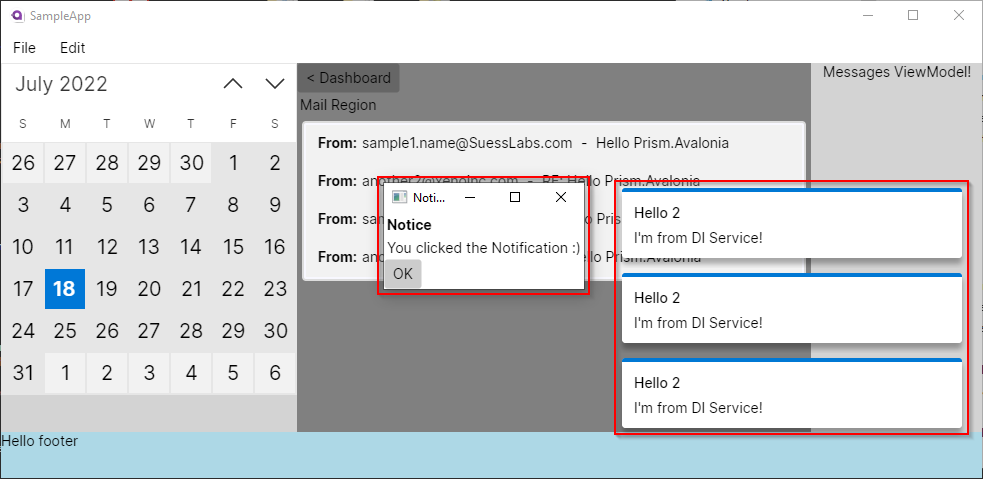
With Prism.Avalonia's logic and development approach being similar to that of Prism for WPF, so you can get started right away! Keep in mind, they are similar and not 1-to-1. Check out our Wiki and Avalonia Outlookish app for tips and tricks.
Package Releases
Just like Prism.WPF or Prism.Maui, your project must reference both the Prism.Avalonia (Core) and Prism.DryIoc.Avalonia (IoC container) packages to work.
| Package | Stable | Preview |
|---|---|---|
| Prism.Avalonia | ||
| Prism.DryIoc.Avalonia |
Version Notice
Choose the NuGet package version that matches your Avalonia version.
Our versioning schema is based on the SemVer using the format MAJOR.MINOR.PATCH.REVISION. The REVISION segment indicates the Avalonia version support. For instance v8.1.97.11073 equates to, Prism v8.1.97, Avalonia v11.0.7, revision 3.
| Prism Version | Avalonia Version | NuGet Package |
|---|---|---|
| v9.0.401-pre | 11.0.7 | v9.0.401.11000-pre (Core) (DryIoc) |
| v9.0.271-pre | 11.0.7 | v9.0.271.11000-pre (Core) (DryIoc) |
| v8.1.97 | 11.0.7 | v8.1.97.11073 (Core) (DryIoc) |
| v8.1.97 | 0.10.21 | v8.1.97.1021 (Core) (DryIoc) |
Be sure to check out the ChangeLog.md and guides when upgrading your NuGet packages:
- Upgrading to Prism v9.0.x-pre
- Upgrading to Avalonia-11
- Also, the official Avalonia Upgrading from v0.10.
Contributing
Prism.Avalonia is an open-source project under the MIT license. We encourage community members like yourself to contribute.
You can contribute today by creating a feature request, issue, or discussion on the forum. From there we can have a brief discussion as to where this fits into the backlog priority. If this is something that fits within the Prism architecture, we'll kindly ask you to create a Pull Request. Any PR made without first having an issue/discussion may be closed.
Issues posted without a description may be closed immediately. Use the discussion boards if you have a question, not Issues.
Install
Add the Prism.Avalonia and its DryIoc packages to your project:
# Avalonia v11
Install-Package Prism.Avalonia -Version 8.1.97.11073
Install-Package Prism.DryIoc.Avalonia -Version 8.1.97.11073

# Avalonia v0.10.1021
Install-Package Prism.Avalonia -Version 8.1.97.1021
Install-Package Prism.DryIoc.Avalonia -Version 8.1.97.1021
How to use
App.xaml.cs
public class App : PrismApplication
{
    public static bool IsSingleViewLifetime =>
        Environment.GetCommandLineArgs()
            .Any(a => a == "--fbdev" || a == "--drm");

    public static AppBuilder BuildAvaloniaApp() =>
        AppBuilder
            .Configure<App>()
            .UsePlatformDetect();

    public override void Initialize()
    {
        AvaloniaXamlLoader.Load(this);
        base.Initialize();              // <-- Required
    }

    protected override void RegisterTypes(IContainerRegistry containerRegistry)
    {
        // Register Services
        containerRegistry.Register<IRestService, RestService>();

        // Views - Generic
        containerRegistry.Register<MainWindow>();

        // Views - Region Navigation
        containerRegistry.RegisterForNavigation<DashboardView, DashboardViewModel>();
        containerRegistry.RegisterForNavigation<SettingsView, SettingsViewModel>();
        containerRegistry.RegisterForNavigation<SidebarView, SidebarViewModel>();
    }

    protected override AvaloniaObject CreateShell()
    {
        if (IsSingleViewLifetime)
            return Container.Resolve<MainControl>(); // For Linux Framebuffer or DRM
        else
            return Container.Resolve<MainWindow>();
    }

    protected override void ConfigureModuleCatalog(IModuleCatalog moduleCatalog)
    {
        // Register modules
        moduleCatalog.AddModule<Module1.Module>();
        moduleCatalog.AddModule<Module2.Module>();
        moduleCatalog.AddModule<Module3.Module>();
    }

    /// <summary>Called after <seealso cref="Initialize"/>.</summary>
    protected override void OnInitialized()
    {
      // Register initial Views to Region.
      var regionManager = Container.Resolve<IRegionManager>();
      regionManager.RegisterViewWithRegion(RegionNames.ContentRegion, typeof(DashboardView));
      regionManager.RegisterViewWithRegion(RegionNames.SidebarRegion, typeof(SidebarView));
    }
}
Program.cs
Your default Avalonia Program.cs file does not need to be modified. Below is provided as a sample.
public static class Program
{
    public static AppBuilder BuildAvaloniaApp() =>
        AppBuilder.Configure<App>()
            .UsePlatformDetect()
            .With(new X11PlatformOptions
            {
                EnableMultiTouch = true,
                UseDBusMenu = true
            })
            .With(new Win32PlatformOptions())
            .UseSkia()
            .UseReactiveUI()
            .UseManagedSystemDialogs();

    static int Main(string[] args)
    {
        double GetScaling()
        {
            var idx = Array.IndexOf(args, "--scaling");
            if (idx != 0 && args.Length > idx + 1 &&
                double.TryParse(args[idx + 1], NumberStyles.Any, CultureInfo.InvariantCulture, out var scaling))
                return scaling;
            return 1;
        }

        var builder = BuildAvaloniaApp();
        InitializeLogging();
        if (args.Contains("--fbdev"))
        {
            SilenceConsole();
            return builder.StartLinuxFbDev(args, scaling: GetScaling());
        }
        else if (args.Contains("--drm"))
        {
            SilenceConsole();
            return builder.StartLinuxDrm(args, scaling: GetScaling());
        }
        else
            return builder.StartWithClassicDesktopLifetime(args);
    }

    static void SilenceConsole()
    {
        new Thread(() =>
        {
            Console.CursorVisible = false;
            while (true)
                Console.ReadKey(true);
        })
        { IsBackground = true }.Start();
    }
}
Branching Strategy
Below is a basic branching hierarchy and strategy.
| Branch | Purpose |
|---|---|
master |
All releases are tagged published using the master branch |
develop |
The default & active development branch. When a feature set is completed and ready for public release, the develop branch will be merged into master and a new NuGet package will be published. |
feature/* |
New feature branch. Once completed, it is merged into develop and the branch must be deleted. |
stable/* |
Stable release base build which shares cherry-picked merges from develop. This branch must not be deleted. |
Sponsored by: Suess Labs a subsidary of Xeno Innovations, Inc.
Changes from Previous Version
Adoption Assessment
Assess this package against its supported frameworks, license, maintenance signals and dependency graph before making it a project standard.
Related Guides & Workflows
Learn how to evaluate, integrate, or audit this package in your .NET project.