A dotnet test logger that tries to strike the right balance between terse and verbose. It attempts to use more colors and visual indicators and extends reporting with slow tests warnings
Get Started
| Product | Versions |
|---|---|
| .NET Standard |
README
Nullean.VsTest.Pretty.TestLogger

A VSTest logger for dotnet test that replaces the default console output: a coloured line for every failed, skipped or slow test, readable stack traces, every failure repeated at the end, and a summary.

Install
dotnet add package Nullean.VsTest.Pretty.TestLogger
Quick start
Reference it from the test project, as a build-time dependency only, and point the project at a .runsettings
file:
<ItemGroup>
  <PackageReference Include="Nullean.VsTest.Pretty.TestLogger" Version="*" PrivateAssets="All" />
</ItemGroup>
<PropertyGroup>
  <RunSettingsFilePath>$(MSBuildProjectDirectory)\.runsettings</RunSettingsFilePath>
</PropertyGroup>
In the .runsettings next to it, turn the console logger off and this one on:
<RunSettings>
  <LoggerRunSettings>
    <Loggers>
      <Logger friendlyName="Console" enabled="False" />
      <Logger friendlyName="pretty" enabled="True" />
    </Loggers>
  </LoggerRunSettings>
</RunSettings>
Or pick it for a single run: dotnet test --logger pretty. Works for F# test projects too.
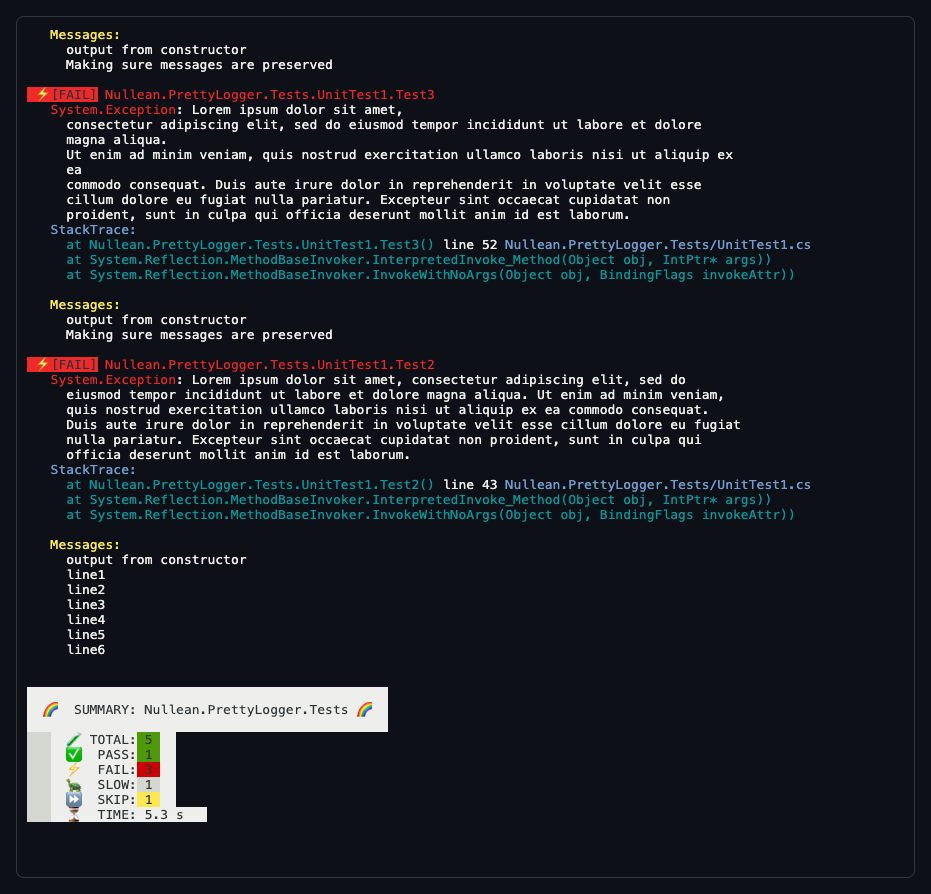
- Clear feedback during tests. Fast passing tests print no line; failed, skipped and slow tests (over two seconds, a fixed threshold) do.
- Readable stack traces, not a sea of red, with each test's output under its failure.
- Every failure repeated at the end, marked
[FAIL]so they are easy to grep, then a summary of passed, failed, slow and skipped tests. - VSTest only. It works with
dotnet teston VSTest (xUnit v2, NUnit, MSTest withMicrosoft.NET.Test.Sdk), not on Microsoft.Testing.Platform, which has no VSTest loggers. Other loggers can run next to it, such as--logger GitHubActions.
To hide the skipped tests of some namespaces, list their prefixes in a run parameter; they still count in the summary:
<TestRunParameters>
  <Parameter name="DisableFullSkipMessages" value="MyTests.Examples.;MyTests.Slow." />
</TestRunParameters>
Learn more
- Recordings: https://asciinema.org/a/363126 (this logger) and https://asciinema.org/a/363123 (
dotnet testout of the box) - Source and issues: https://github.com/nullean/vstest-pretty-logger
Downloads by Version
Similar & Alternative Packages
Hand-picked matching NuGet libraries based on tags & ecosystem
Depended On By
Find packages that declare this package as a dependency. NuGet does not provide a reverse-dependency endpoint, so candidates are checked on demand.
Adoption Assessment
Assess this package against its supported frameworks, license, maintenance signals and dependency graph before making it a project standard.
Related Guides & Workflows
Learn how to evaluate, integrate, or audit this package in your .NET project.