Install
| Product | Versions |
|---|---|
| .NET |
README
Nullean.Snapshots.Images

PNG image snapshots for Nullean.Snapshots: decoded with its own PNG codec and compared pixel by pixel, perceptually and with anti-aliasing left out, so a screenshot passes on every machine. On a mismatch it writes a diff image.

Install
dotnet add package Nullean.Snapshots.Images
Quick start
This package holds the format, the PNG codec and the comparison, with no AwesomeAssertions, so the browser package and the native snap tool can compare screenshots. In tests, use Nullean.Snapshots.Images.Assertions (png.Should().MatchImageSnapshot()). Used on its own:
using System.Runtime.CompilerServices;
using Nullean.Snapshots;
using Nullean.Snapshots.Images;

public static class ImageChecks
{
	// The format on its own, without AwesomeAssertions: how the browser package and snap compare screenshots.
	public static void MatchPng(byte[] png, [CallerFilePath] string file = "", [CallerMemberName] string member = "", [CallerLineNumber] int line = 0)
	{
		var format = new ImageSnapshotFormat(new ImageSnapshotOptions { MaxDifferentRatio = 0.001, OutlineRegions = true });
		var result = Snapshot.Match(png, format, new SnapshotCallSite(file, member, line));
		if (!result.Passed)
			throw new InvalidOperationException(result.FailureMessage); // a .received-diff.png sits next to the received image
	}
}
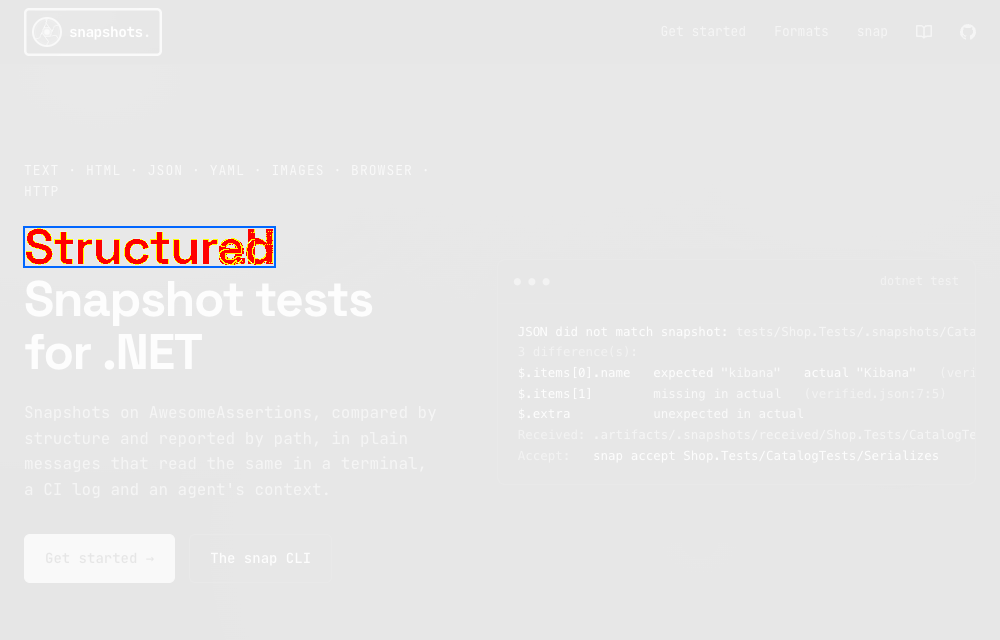
The diff image is the verified image faded to grey, with differing pixels in red and anti-aliasing in yellow;
OutlineRegions draws a blue box around each changed region.
- Pixels, not bytes. Metadata chunks, encoders and compression levels never fail a test.
- Differences as people see them. A pixel differs when its YIQ distance exceeds
Threshold(default 0.1). - Anti-aliasing left out, unless
IncludeAntiAliasingis set.MaxDifferentPixelsandMaxDifferentRatioallow some noise.
Learn more
- Documentation: https://snapshots.nullean.net
- Image snapshots: https://snapshots.nullean.net/formats/images/
- Source and issues: https://github.com/nullean/snapshots
Changes from Previous Version
Adoption Assessment
Assess this package against its supported frameworks, license, maintenance signals and dependency graph before making it a project standard.
Related Guides & Workflows
Learn how to evaluate, integrate, or audit this package in your .NET project.