Install
| Product | Versions |
|---|---|
| .NET |
README
Iciclecreek.Avalonia.Terminal For Avalonia 12.x
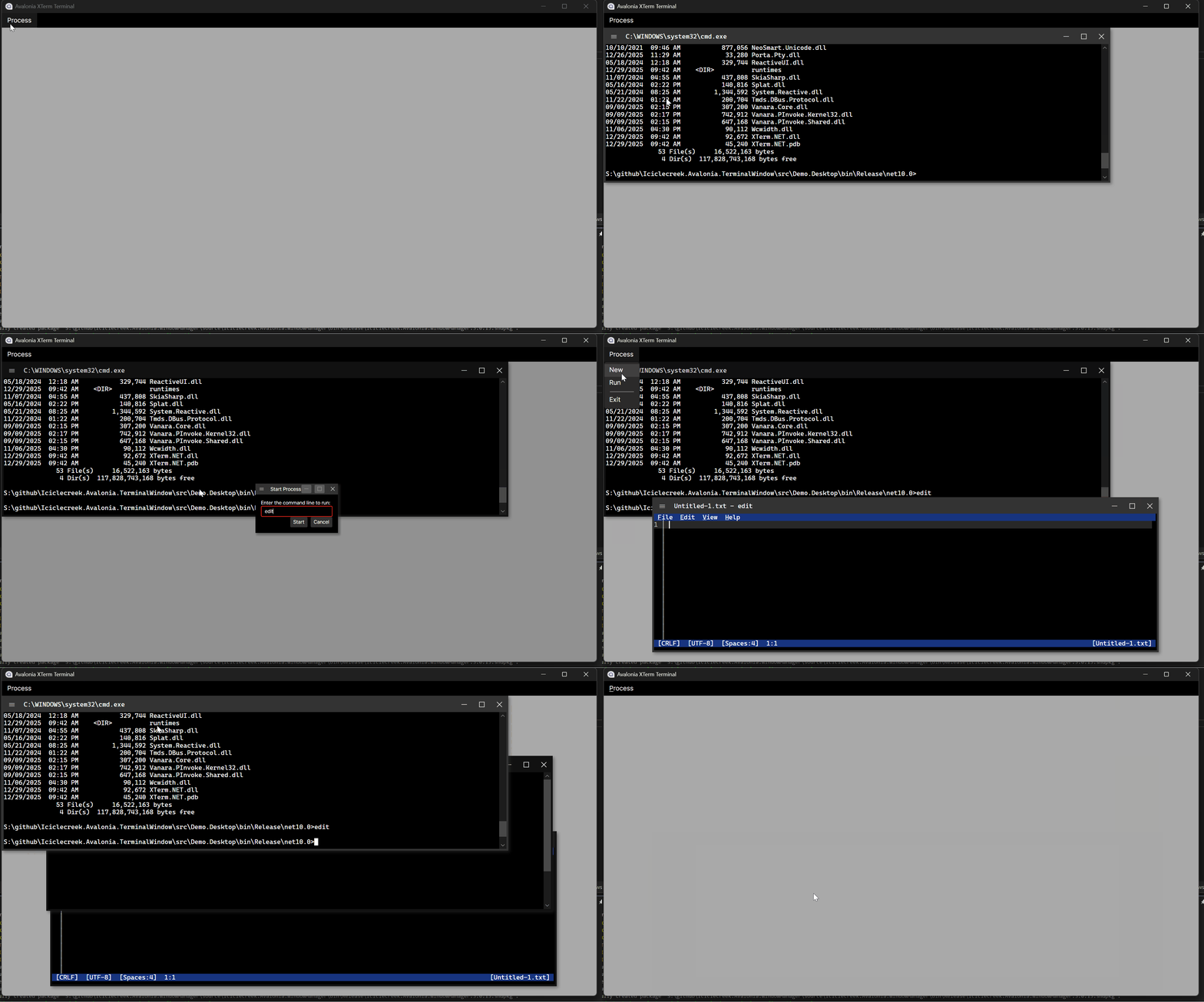
A cross-platform XTerm terminal emulator control for Avalonia UI applications.


Introduction
Iciclecreek.Avalonia.Terminal provides Avalonia controls for embedding a fully-featured terminal emulator in your cross-platform desktop applications. Built on top of XTerm.NET for terminal emulation and Porta.Pty for pseudo-terminal support, it offers:
- Full XTerm-compatible terminal emulation
- Cross-platform support (Windows, Linux, macOS)
- Scrollback buffer with configurable size
- Text selection and clipboard support
- Terminal window manipulation commands (resize, move, minimize, maximize, etc.)
- Dynamic title updates from terminal escape sequences
- Customizable fonts, colors, and styling
Installation
Install via NuGet Package Manager:
dotnet add package Iciclecreek.Avalonia.Terminal
Or via the Package Manager Console in Visual Studio:
Install-Package Iciclecreek.Avalonia.Terminal
Usage
TerminalControl
TerminalControl is a templated control that provides a terminal view with an integrated scrollbar. Use this when you want to embed a terminal within your own window or layout.
XAML:
<Window xmlns="https://github.com/avaloniaui"
        xmlns:x="http://schemas.microsoft.com/winfx/2006/xaml"
        xmlns:terminal="using:Iciclecreek.Terminal"
        x:Class="MyApp.MainWindow">

    <terminal:TerminalControl x:Name="Terminal"
                              FontFamily="Cascadia Mono"
                              FontSize="14"
                              BufferSize="1000"
                              ProcessExited="OnProcessExited"/>
</Window>
Code-behind:
using Avalonia.Controls;
using Iciclecreek.Terminal;

public partial class MainWindow : Window
{
    public MainWindow()
    {
        InitializeComponent();
    }

    private void OnProcessExited(object? sender, ProcessExitedEventArgs e)
    {
        // Handle process exit (e.g., close window)
        Close();
    }
}
Properties:
| Property | Type | Default | Description |
|---|---|---|---|
Process |
string |
cmd.exe (Windows) / bash (Unix) |
The shell or process to launch |
Args |
IList<string> |
Empty | Command-line arguments for the process |
StartingDirectory |
string? |
Current working directory | The initial working directory used when launching the PTY process |
CurrentDirectory |
string? |
Read-only | The current working directory reported by the running terminal session via OSC 7 |
ExitCode |
int |
Read-only | The exit code of the launched process after it has terminated |
Pid |
int |
Read-only | The operating system process identifier of the launched terminal process |
BufferSize |
int |
1000 |
Scrollback buffer size (number of lines) |
VerbatimCommandLine |
bool |
false |
When false, each entry in Args reaches the process as a distinct argument, quoted so it arrives exactly as written. Set true to join the entries into one command line and let the process parse it itself. Windows only — Unix passes an argument vector to exec, so there is nothing to build |
EnvironmentVariables |
IDictionary<string,string>? |
null |
Extra environment variables for the launched process. Merged into the environment it would otherwise inherit, not substituted for it, so setting one variable does not cost you PATH. TERM is already set to xterm-256color by the PTY layer |
FontFamily |
FontFamily |
Monospace stack | Terminal font family. Defaults to Cascadia Mono and friends, falling back to the platform's generic monospace — a terminal must not inherit a proportional UI font. Set it to override |
FontSize |
double |
Inherited | Terminal font size |
Foreground |
IBrush |
White |
Default text color |
Background |
IBrush |
Black |
Terminal background color |
SelectionBrush |
IBrush |
Semi-transparent blue | Text selection highlight color |
TextDecorations |
TextDecorationLocation? |
null |
Text decorations applied to terminal text |
CursorColor |
Color |
White |
Cursor color |
CursorStyle |
CursorStyle |
Bar |
Cursor shape — Bar, Block or Underline |
CursorBlink |
bool |
true |
Whether the cursor blinks |
CursorBlinkRate |
int |
530 |
Blink interval in milliseconds |
ViewportY |
int |
Live | Absolute line index of the top of the viewport. Settable, to drive your own scrollbar |
MaxScrollback |
int |
Read-only | Largest valid ViewportY — total buffer lines minus visible lines |
ViewportLines |
int |
Read-only | Number of lines visible |
IsAlternateBuffer |
bool |
Read-only | True while a full-screen application (vim, htop, less) is using the alternate screen buffer |
IsLive |
bool |
Read-only | True while a PTY is attached and its process has not exited |
Methods:
| Method | Description |
|---|---|
LaunchProcess() |
Launches the configured Process with the current Args and StartingDirectory |
LaunchProcess(string? startingDirectory, string process, params string[] args) |
Convenience overload that sets StartingDirectory, Process, and Args, then launches the process |
Kill() |
Terminates the running terminal process |
SendInputAsync(string text, CancellationToken) |
Sends text to the running process as if typed. Sent verbatim, so append \r to submit a command: SendInputAsync("ls -la\r"). Does nothing when no process is running |
CopyAsync() |
Copies the selection to the clipboard. Returns false when nothing was selected |
PasteAsync() |
Pastes clipboard text into the terminal |
AttachConnection(IPtyConnection) |
Drives the terminal from a PTY the caller owns. Throws if the template has not been applied |
DetachConnection() |
Stops following the current connection and hands it back, without stopping the process |
WaitForExit(int ms) |
Waits for the terminal process to exit or for the specified timeout to elapse |
Events:
| Event | Description |
|---|---|
ProcessExited |
Raised when the PTY process exits. The handler receives ProcessExitedEventArgs with the process ExitCode. |
TerminalWindow
TerminalWindow is a complete window implementation that automatically handles terminal events like title changes and window manipulation commands. Use this when you want a standalone terminal window.
XAML:
<terminal:TerminalWindow xmlns="https://github.com/avaloniaui"
                         xmlns:x="http://schemas.microsoft.com/winfx/2006/xaml"
                         xmlns:terminal="using:Iciclecreek.Terminal"
                         x:Class="MyApp.TerminalWindow"
                         Title="Terminal"
                         Width="800"
                         Height="600"
                         FontFamily="Consolas"
                         FontSize="12"
                         Background="Black"
                         Foreground="White"
                         CloseOnProcessExit="True"
                         UpdateTitleFromTerminal="True"/>
Or create programmatically:
using Iciclecreek.Terminal;

var terminalWindow = new TerminalWindow
{
    Title = "My Terminal",
    Width = 800,
    Height = 600,
    FontFamily = new FontFamily("Cascadia Mono"),
    FontSize = 14,
    StartingDirectory = Environment.CurrentDirectory,
    Process = "pwsh.exe",  // PowerShell Core
    Args = new[] { "-NoLogo" },
    CloseOnProcessExit = true
};

terminalWindow.Show();
Methods:
| Method | Description |
|---|---|
LaunchProcess() |
Launches the configured Process with the current Args and StartingDirectory |
LaunchProcess(string? startingDirectory, string process, params string[] args) |
Convenience overload that sets StartingDirectory, Process, and Args, then launches the process |
Kill() |
Terminates the running terminal process |
SendInputAsync(string text, CancellationToken) |
Sends text to the running process as if typed. Sent verbatim, so append \r to submit a command: SendInputAsync("ls -la\r"). Does nothing when no process is running |
CopyAsync() |
Copies the selection to the clipboard. Returns false when nothing was selected |
PasteAsync() |
Pastes clipboard text into the terminal |
AttachConnection(IPtyConnection) |
Drives the terminal from a PTY the caller owns. Throws if the template has not been applied |
DetachConnection() |
Stops following the current connection and hands it back, without stopping the process |
WaitForExit(int ms) |
Waits for the terminal process to exit or for the specified timeout to elapse |
Additional Properties (beyond TerminalControl):
| Property | Type | Default | Description |
|---|---|---|---|
ExitCode |
int |
Read-only | The exit code of the launched process after it has terminated |
Pid |
int |
Read-only | The operating system process identifier of the launched terminal process |
CloseOnProcessExit |
bool |
true |
Automatically close the window when the process exits |
UpdateTitleFromTerminal |
bool |
true |
Update window title from terminal escape sequences |
Window manipulation commands from the terminal (resize, move, minimize, maximize, raise, lower, fullscreen) are always handled. Handle the corresponding bubbling event from TerminalView and mark it Handled to suppress the default behaviour for any of them.
TerminalWindow exposes everything TerminalControl does, forwarding each member to the control it hosts, and TerminalControl in turn exposes everything TerminalView does. A test walks all three surfaces by reflection and fails if they drift apart, so a member added to the view without a forwarder breaks the build rather than going unnoticed.
Events:
| Event | Description |
|---|---|
ProcessExited |
Raised when the PTY process exits. The handler receives ProcessExitedEventArgs with the process ExitCode. If CloseOnProcessExit is true, the event is raised before the window closes. |
Render frame rate
Terminals repaint on a shared, throttled frame rather than on every chunk of output, so a window hosting several of them does one invalidation pass instead of one per terminal per chunk. The rate defaults to 30 FPS and is settable:
using Iciclecreek.Terminal;

TerminalRenderThrottle.TargetFrameRate = 60;   // valid range 1–1000
Raise it for a smoother repaint on a high-refresh display, or lower it to hand UI-thread time back to the rest of the app — a terminal streaming build output at 10 FPS is still perfectly readable and costs a third of the invalidations. Because the frame is shared, the setting is global rather than per-terminal: it applies to every terminal already open, from the next frame scheduled. Safe to set from any thread.
Links
- GitHub Repository: https://github.com/tomlm/Iciclecreek.Avalonia.TerminalWindow
- NuGet Package: https://www.nuget.org/packages/Iciclecreek.Avalonia.Terminal
- XTerm.NET: https://github.com/tomlm/XTerm.NET
- Porta.Pty: https://github.com/tomlm/Porta.Pty
- Avalonia UI: https://avaloniaui.net/
License
This project is licensed under the MIT License - see the LICENSE file for details.
Changes from Previous Version
Adoption Assessment
Assess this package against its supported frameworks, license, maintenance signals and dependency graph before making it a project standard.
Related Guides & Workflows
Learn how to evaluate, integrate, or audit this package in your .NET project.