Any Framework
DockControl for WPF delivers dockable, floating, and tabbed windows, similar to the docking system in Microsoft Visual Studio.
Published
Jul 17, 2023
3y ago
Total Downloads
38.4K
38,428
Install
dotnet add package C1.Xaml.WPF.Docking --version 4.6.20232.790
No framework information available.
README
About
The ComponentOne WPF Docking library provides a multi-tabbed, docking interface inspired by Microsoft Visual Studio. Deliver customizable workspaces to your users complete with resizing, floating, and auto-hiding capabilities.
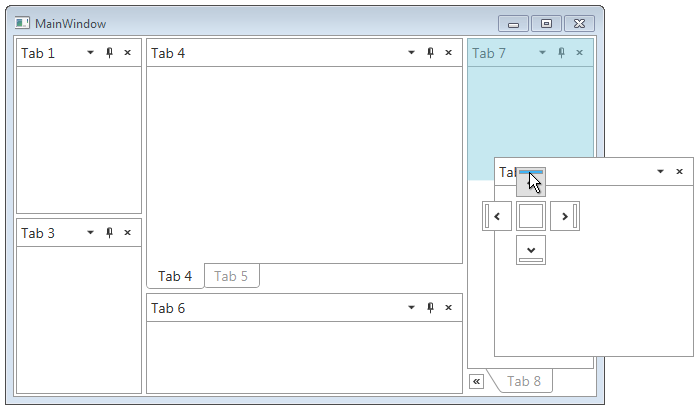
Key Features:
- Float and drag tabs outside your desktop application
- Dock tabs using a diamond UI paradigm just like Visual Studio
- Tabs can slide open and closed just like the pin (auto-hide) behavior seen in Visual Studio
- The C1DockTabControl will hide the tab header when only one tab exists
- In code you can persist layouts and restrict docking of certain tabs
Learn more at www.grapecity.com/componentone/wpf-ui-controls/custom-workspace-dockcontrol-wpf.
Resources
Changes from Previous Version
No structural changes between v4.6.20231.786 and v4.6.20232.790.
Adoption Assessment
Assess this package against its supported frameworks, license, maintenance signals and dependency graph before making it a project standard.
No SPDX license expression is published. Review the license text and your organisation's policy before redistribution.No target framework metadata is available. Confirm compatibility in a representative project before standardising on this package.
Related Guides & Workflows
Learn how to evaluate, integrate, or audit this package in your .NET project.