.NETFramework4.6.2
用于WPF平台的DockControl提供了可扩展,浮动和标签窗口的窗口,类似于Microsoft Visual Studio中的对接系统。
Published
Sep 18, 2025
1y ago
Total Downloads
3.7K
3,666
Install
dotnet add package C1.Xaml.WPF.Docking.Cn --version 4.6.20251.889
| Product | Versions |
|---|---|
| Other |
README
About
The ComponentOne WPF Docking library provides a multi-tabbed, docking interface inspired by Microsoft Visual Studio. Deliver customizable workspaces to your users complete with resizing, floating, and auto-hiding capabilities.
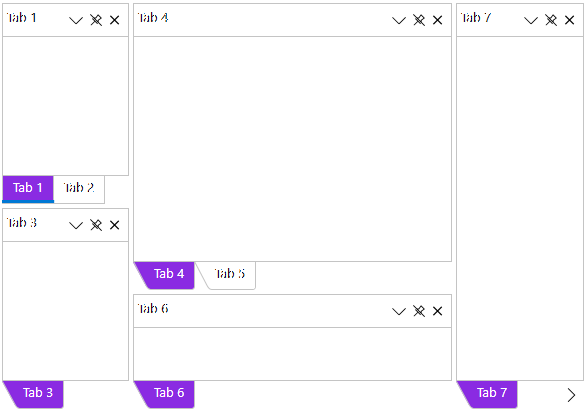
Key Features:
- Float and drag tabs outside your desktop application
- Dock tabs using a diamond UI paradigm just like Visual Studio
- Tabs can slide open and closed just like the pin (auto-hide) behavior seen in Visual Studio
- The C1DockTabControl will hide the tab header when only one tab exists
- In code you can persist layouts and restrict docking of certain tabs
Learn more at developer.mescius.com/componentone/wpf-ui-controls/custom-workspace-dockcontrol-wpf.
Resources
Changes from Previous Version
No structural changes between v4.6.20251.884 and v4.6.20251.889.
Adoption Assessment
Assess this package against its supported frameworks, license, maintenance signals and dependency graph before making it a project standard.
No SPDX license expression is published. Review the license text and your organisation's policy before redistribution.Compatibility metadata lists 1 target framework; confirm the exact target used by your application.
Related Guides & Workflows
Learn how to evaluate, integrate, or audit this package in your .NET project.