net5.0
Though it's similar to the TreeView control available in the box, ComponentOne TreeView for WPF provides more powerful features like autosearch, drag-and-drop, and hierarchical templates.
Published
Dec 3, 2021
4y ago
Total Downloads
46.5K
46,495
Install
dotnet add package C1.WPF.TreeView --version 5.0.20213.155
| Product | Versions |
|---|---|
| .NET |
README
About
The ComponentOne WPF TreeView can visualize, edit, and select hierarchical data as a tree. It provides more powerful features than the standard one like auto-search, drag-and-drop, and hierarchical templates.
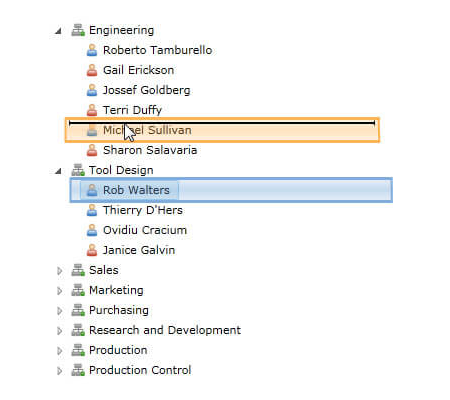
Key Features:
- Customize the nodes with text, images, and connecting lines
- Allow users to edit the text within the TreeView
- Fully interactive with support for expanding, collapsing, dragging and reordering
- Provide selection of multiple items
- Create data bound or unbound treeviews
- With auto-search, users can just type a letter to quickly jump to a matching node
- With on-demand loading, nodes are populated when the user expands them
Learn more at www.grapecity.com/componentone/wpf-ui-controls/treeview-control-wpf.
Resources
Changes from Previous Version
v5.0.20212.112v5.0.20213.155
Added Frameworks
net5.0
Added Dependencies
C1.WPF.Core(net5.0)
C1.WPF.Input(net5.0)
Removed Dependencies
Adoption Assessment
Assess this package against its supported frameworks, license, maintenance signals and dependency graph before making it a project standard.
No SPDX license expression is published. Review the license text and your organisation's policy before redistribution.Compatibility metadata lists 1 target framework; confirm the exact target used by your application.
Related Guides & Workflows
Learn how to evaluate, integrate, or audit this package in your .NET project.